Before you begin, it helps to understand why structure should come before design. This guide explains the topic in practical terms and connects it to the decisions, setup, or Listdom workflow covered below.

Before you begin, it helps to understand why structure should come before design. This guide explains the topic in practical terms and connects it to the decisions, setup, or Listdom workflow covered below.
Why structure should come before design
Design is visible.
Structure is not.
That is exactly why beginners often give design more attention first.
But in a directory site, structure usually affects much more than the layout.
It affects:
- how listings are organized
- how search works
- how taxonomy archives behave
- how shortcode pages are planned
- how custom fields are used
- how frontend submission behaves
- how easy the site is to grow later
A strong structure makes the design phase easier.
A weak structure makes every later phase heavier.
Build with Listdom
Build your directory website with Listdom
Launch a polished WordPress directory with listings, locations, maps, search, and room to grow into a full directory business.
The biggest mistake: designing before deciding the data model
A directory site is not only a collection of pretty pages.
It is a content system.
That means before you design listing cards, build search pages, or choose skins, you should decide what kind of content system you are actually building.
For example:
- what kinds of listings will exist?
- how should locations be organized?
- which details belong to categories?
- which belong to custom fields?
- which belong to features, labels, or tags?
- what should users be able to search by?
- what kinds of front-end pages will the site actually need?
Those are structure questions first.
Start with the kind of directory you are building
Before touching the details, define the main type of site.
Examples:
- local business directory
- restaurant directory
- hotel directory
- doctor directory
- real estate directory
- service provider directory
- staff directory
- classified or listing marketplace
This step matters because the structure should follow the real use case.
If you have not settled on that use case yet, first choose a focused directory website niche so your categories, locations, fields, and search decisions are answering a real visitor need.
A restaurant directory and a real estate directory should not be structured the same way just because they both use Listdom.
Decide your main listing types first

Your first real structure decision is usually the listing type model.
Ask:
What kinds of listings will this site include?
Examples:
- restaurants
- hotels
- doctors
- lawyers
- properties
- shops
- events
These usually become the early category structure.
This is why categories should be decided before layout design.
If you are not clear on the listing types yet, the rest of the site usually stays vague too.
Decide your location model next

After listing types, think about geography.
Ask:
How will users think about place on this site?
Examples:
- country → city
- state → city
- city → neighborhood
- region → district
This matters because locations affect:
- search
- archives
- map behavior
- browsing logic
- how easy the site feels to navigate
The best location model is not the deepest one.
It is the one that matches how your users actually search.
If you need the detailed taxonomy explanation, see How Listings, Categories, and Locations Work in Listdom.
Decide what should be categories, features, labels, tags, and custom fields

This is one of the most important structural decisions in Listdom.
A lot of directory mess starts when users put the same kind of idea in the wrong layer.
A practical structure rule looks like this:
- use categories for the main listing type
- use locations for place
- use custom fields for structured listing-specific data
- use features for useful attributes
- use labels for emphasis or status
- use tags for lighter descriptive keywords
A few examples:
- Restaurant = category
- Barcelona = location
- Reservation URL = custom field
- Outdoor Seating = feature
- Featured = label
- Romantic = tag
If this distinction is unclear, the site usually becomes harder to search and harder to scale.
These companion articles go deeper into each part:
Decide what users actually need to search by

This is where structure and user experience start to meet.
Before creating a search form, ask:
What are the real filters or search inputs users will care about?
Examples:
- category
- location
- keyword
- price range
- features
- custom field values
- date or availability-related data
Do not build the search form first and hope the structure supports it later.
Instead, let the search needs help shape the structure.
If something will be important for filtering later, it should be modeled correctly now.
Decide what kinds of pages you really need
Another big beginner mistake is creating pages too early without deciding what role each page should play.
Before building pages, ask:
- do I need taxonomy archive pages to do most of the work?
- do I need manual shortcode pages for more control?
- do I need one main directory page or several section pages?
- do I want a homepage search block that leads into deeper result pages?
- do I want category-specific landing pages?
This matters because page planning should follow the structure.
A taxonomy archive page, a shortcode page, a results page, and a single listing page are not the same thing.
If you want that front-end system explained clearly, see How Listdom Shortcodes, Search Forms, Archives, and Pages Work Together.
For a deeper decision guide focused specifically on term archives, see How Taxonomy Archive Pages Work in Listdom.
Define what the single listing page should eventually show

Even though this article is about structure before design, the single listing page still matters in the planning stage.
Why?
Because the quality of the single listing page depends on the quality of the data model behind it.
If you do not plan:
- the right categories
- the right custom fields
- the right features
- the right display-related elements
then later the single listing page may look thin no matter how much time you spend styling it.
So even before design, ask:
What should each listing page really contain?
Then build the structure to support that answer.
If you want the full article on that layer, see How Single Listing Pages Work in Listdom.
Check whether the structure will also work for frontend submission

This is another place where planning early helps a lot.
If your site will use frontend submission, structure decisions should not be made only from the admin point of view.
Ask:
- will users understand these fields?
- are there too many inputs?
- should they choose labels, features, or tags themselves?
- should some elements be restricted by package?
- is the form asking for information that users may not realistically have?
The practical place to review this later is:
Listdom → Settings → Frontend Dashboard
But the planning question comes earlier.
A structure that works for admins is not always a structure that works for frontend users.
Before opening submissions, use How to Configure the Add Listing Form in Listdom to turn those structure decisions into a clear user-facing form.
If that layer matters to your project, see How the Listdom Frontend Dashboard Works.
Add packages and monetization only after the structure is clear

This is a big one.
Many site owners start thinking about premium plans too early, before they have decided what the actual listing structure should be.
That creates messy package logic.
A better order is:
- define what a complete listing should contain
- define which parts are optional or premium
- then use packages, labels, modules, or limits to monetize that structure cleanly
That way monetization becomes a controlled layer on top of the structure, not a substitute for good planning.
If you are working on that part later, these companion articles help:
- How Listdom Membership Packages Work
- How to Set Up Payments in Listdom (WooCommerce vs Listdom Payments)
Use demos and toolkits as starting points, not structure decisions
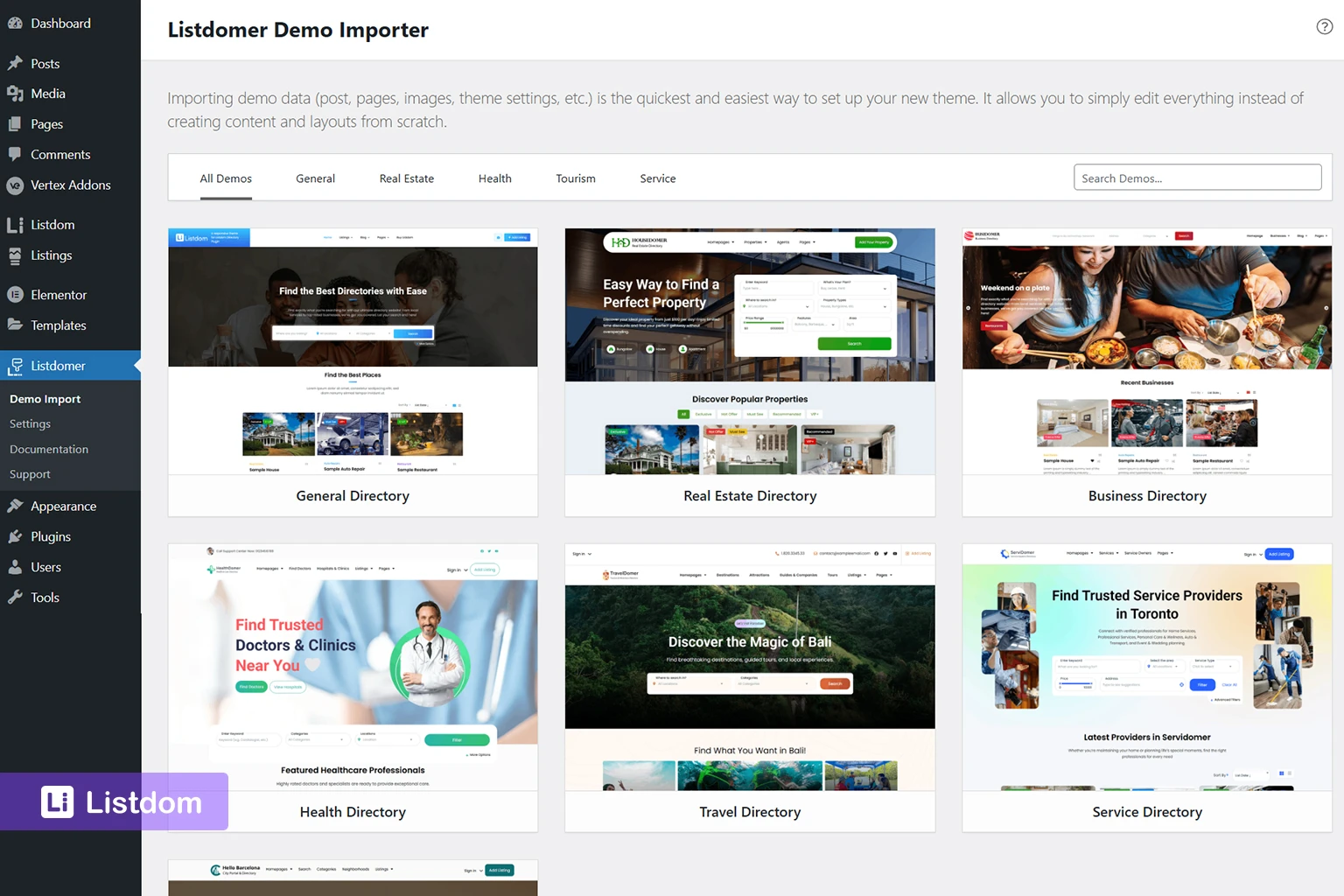
Demos and toolkits can be useful.
But they should not replace structure thinking.
A demo can give you:
- sample layouts
- sample content patterns
- visual direction
- faster starting points
What it should not do is stop you from asking whether the structure actually matches your project.
Before committing to a demo or toolkit, ask:
- do the categories match my use case?
- do the locations match my geography model?
- do the fields match the information I really need?
- does the page structure fit my front-end plan?
- is this helping me start faster, or is it creating cleanup later?
That mindset makes demos much more useful.
Implementation guide
Need the technical details?
Use the Listdom documentation to configure listings, shortcodes, search forms, maps, and add-ons with confidence.
A practical structure-first planning sequence
Here is a simple planning order that works well for most Listdom projects.
Step 1: define the directory type
What kind of directory are you building?
Step 2: define the main listing types
What categories will the site actually need?
Step 3: define the location model
How should geography work for your users?
Step 4: define the structured data model
Which details belong to custom fields, features, labels, and tags?
Step 5: define the search needs
What do users need to search or filter by?
Step 6: define the page model
Which pages should be taxonomy archives, shortcode pages, results pages, or landing pages?
Step 7: define the single listing page content needs
What should every good listing page contain?
Step 8: review frontend submission logic
Will users be able to provide this information clearly?
Step 9: use the structure as your gate to start designing
Now the layouts, skins, builders, and search-page design decisions will make much more sense.
At this point, you are no longer designing around guesses. You are designing on top of a clearer system.
That is the right moment to move into the broader design and implementation workflow in the official Listdom documentation: https://docs.webilia.com/listdom
That documentation is the best next step once your categories, locations, fields, taxonomies, page roles, search needs, and submission logic are clear.
Common beginner mistakes
Importing a demo and assuming the structure is already correct
A demo is a starting point, not a final structure decision.
Creating too many taxonomies too early
A huge structure feels powerful at first, but it often becomes harder to manage.
Using categories where custom fields or features would be better
This makes the content model harder to search and maintain.
Designing pages before knowing what the pages should actually show
That creates layout work without a stable data model underneath it.
Building search before deciding what users really need to filter by
The search form should follow the structure, not try to invent it.
Thinking only about backend management and not about frontend submission
A structure that feels fine in wp-admin may still feel heavy or confusing to real users.
What to do first if your site already feels messy
If the project is already partially built and the structure feels wrong, do not start by redesigning the front end again.
Start by reviewing these questions:
- are the categories still correct?
- is the location hierarchy still right?
- are custom fields doing the right job?
- are features, labels, and tags being used clearly?
- does the search form reflect real user needs?
- are pages doing the right jobs, or are too many things mixed together?
That review often fixes more than a quick design pass.
What to learn next
Once the structure plan is clear, the next best articles are:
- How Listings, Categories, and Locations Work in Listdom
- How Custom Fields Work in Listdom
- How Labels, Features, and Tags Work in Listdom
- How Listdom Shortcodes, Search Forms, Archives, and Pages Work Together
- How Single Listing Pages Work in Listdom
These articles explain each part of the structure in more depth.
Listdom ecosystem
Build the directory workflow described in this guide
Use related Listdom products, add-ons, and planning pages to turn this guide into a structured directory project.
Final thoughts
The best time to think about structure is before the design feels urgent.
That is when the decisions are cheaper, cleaner, and easier to change.
If you build the structure first, Listdom becomes much easier to manage later.
Search works better.
Pages make more sense.
Single listing pages feel richer.
And the design phase becomes more focused because it is built on top of a clearer system.
FAQ
Why should I plan the directory structure before designing pages?
Because the structure affects search, taxonomies, custom fields, archives, shortcode pages, and the single listing page. Design becomes much easier when those decisions are clear first.
What should I decide first in a Listdom project?
Usually the directory type, the main listing categories, the location model, and the data model for fields and taxonomies.
Should I create the search form before planning the structure?
Usually no. It is better to decide what users need to search by first, then build the search form around that.
Should demos decide the structure for me?
No. Demos are useful starting points, but the real structure should still be planned around your actual project.
When should I think about packages and monetization?
After the listing structure is clear. Monetization works much better when it is layered on top of a well-planned content system.
What if my site is already built and the structure feels messy?
Start by reviewing the category model, location model, fields, taxonomies, search logic, and page roles before redesigning the front end again.
FAQ
Common questions
Why should I plan the directory structure before designing pages?+
Because the structure affects search, taxonomies, custom fields, archives, shortcode pages, and the single listing page. Design becomes much easier when those decisions are clear first.
What should I decide first in a Listdom project?+
Usually the directory type, the main listing categories, the location model, and the data model for fields and taxonomies.
Should I create the search form before planning the structure?+
Usually no. It is better to decide what users need to search by first, then build the search form around that.
Should demos decide the structure for me?+
No. Demos are useful starting points, but the real structure should still be planned around your actual project.
When should I think about packages and monetization?+
After the listing structure is clear. Monetization works much better when it is layered on top of a well-planned content system.
What if my site is already built and the structure feels messy?+
Start by reviewing the category model, location model, fields, taxonomies, search logic, and page roles before redesigning the front end again.