What is a healthcare directory website?
A healthcare directory website helps visitors find healthcare-related providers, places, or services.
Depending on your project, the directory may include:
- doctors
- clinics
- hospitals
- dentists
- therapists
- wellness centers
- diagnostic centers
- pharmacies
- specialists
- healthcare service providers
- medical offices
- emergency or urgent care centers
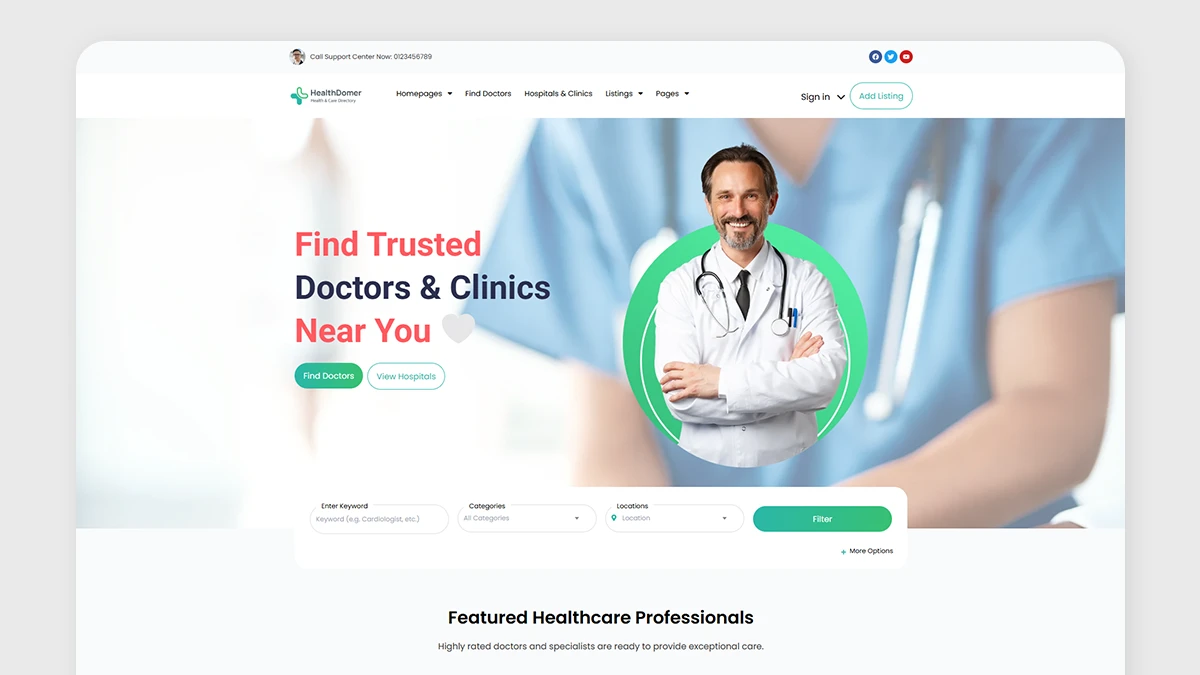
Some healthcare directories are broad. They include many types of providers across a city, country, or region. Others are narrow. For example, a directory might focus only on dentists, physiotherapists, mental health professionals, clinics, or private hospitals.
The directory model matters because it affects everything else. A hospital directory needs different listing data than a therapist directory. A clinic directory needs different search filters than a pharmacy directory. A wellness provider directory may need booking and service information, while a hospital directory may focus more on departments, addresses, and contact details.
Before choosing layouts or plugins, define what kind of healthcare directory you are building.
Why healthcare directories need a structured system
A healthcare directory is usually more complex than a simple local business directory.
A normal business directory may only need a name, category, address, phone number, and map marker. A healthcare directory often needs more detailed information because visitors make decisions based on trust, relevance, distance, and availability.
A strong healthcare directory may need:
- provider or facility profiles
- specialties and service categories
- city, neighborhood, or region structure
- addresses and map locations
- custom fields for healthcare-specific details
- search forms and filters
- reviews, ratings, or trust signals where appropriate
- frontend submission for doctors or clinics
- moderation before publishing
- user dashboards for listing owners
- appointment or booking workflows
- monetization options for provider profiles or visibility
This is why the directory should be planned as a system.
Listdom can help you build this kind of structure in WordPress because it gives you the core directory layers: listings, categories, locations, custom fields, search forms, map display, frontend submission, user dashboards, shortcodes, skins, and add-on workflows.
A healthcare directory works best when those layers support each other.
What to plan before building
Before creating pages or adding many listings, answer a few planning questions.
What will each listing represent?
Your listing can represent different things:
- one doctor
- one clinic
- one hospital
- one department
- one healthcare service
- one wellness provider
- one office location
This choice affects your data model.
For example, if each listing is a doctor, the listing may need specialty, education, clinic address, appointment options, languages, and accepted insurance. If each listing is a clinic, the listing may need departments, doctors, opening hours, facilities, parking, services, and contact details.
Will doctors and clinics be separate listing types?
Some directories list doctors and clinics separately. Others list only facilities. Some list both.
A doctor may work in more than one clinic. A clinic may have many doctors. A hospital may have departments, services, and specialists.
At the beginning, keep the model simple enough to manage. A common structure is:
- categories for provider or facility type
- custom fields for detailed attributes
- locations for city or area
- addresses for the physical place
How will visitors search?
Healthcare visitors usually search by a mix of:
- specialty
- city or area
- provider name
- clinic name
- service type
- address or nearby location
- insurance
- language
- appointment type
- opening hours or availability
- accessibility
Your search form should reflect the real search behavior of your users.
Will providers submit their own listings?
If only admins manage listings, the workflow is simpler. If doctors, clinics, or healthcare businesses submit their own listings, you need a frontend submission and review process.
That may include:
- login and registration
- add listing form
- frontend dashboard
- moderation
- listing ownership
- edit permissions
- payment or package rules, if monetized
Will the directory be monetized?
Healthcare directories can be monetized, but trust should come first.
Possible models include:
- paid provider profiles
- membership packages
- featured listings
- claim listing workflows
- sponsored placements
- booking-related monetization
- advertising, where appropriate
The best model depends on your audience, region, and trust policy.
Healthcare listing structure
A good healthcare listing should give visitors enough information to decide whether the provider or facility is relevant.
A basic healthcare listing may include:
- listing title
- provider or clinic name
- description
- category or specialty
- location
- address
- map position
- phone number
- website
- email or contact form
- images
- working hours
- services
- custom fields
- social or external profile links, if relevant
In Listdom, the listing is the main content unit. Categories help explain what the listing is. Locations help organize where it belongs. Address and coordinates help maps place it accurately.
For a deeper introduction to this structure, read How Listings, Categories, and Locations Work in Listdom.
The important point is that a healthcare listing should not be treated as a simple card with a title and image. It should be a structured profile.
Categories and specialties
Categories are one of the most important parts of a healthcare directory.
They help users browse and filter listings by provider type, facility type, or medical area.
Examples of healthcare categories include:
- Doctors
- Clinics
- Hospitals
- Dentists
- Pharmacies
- Therapists
- Physiotherapists
- Dermatologists
- Pediatricians
- Cardiologists
- Diagnostic Centers
- Wellness Centers
You can also use categories for specialties, but you should plan carefully.
For example, if your directory is mainly about doctors, categories might be specialties:
- Cardiology
- Dermatology
- Pediatrics
- Neurology
- Orthopedics
- Psychiatry
- Dentistry
- Physiotherapy
If your directory includes many facility types, categories may need to separate listing types first:
- Hospitals
- Clinics
- Doctors
- Dentists
- Labs
- Pharmacies
Then specialties can be handled through custom fields, labels, features, or a more detailed taxonomy approach, depending on the structure you want.
The goal is to make browsing easy. Do not create so many categories that users feel lost. Also avoid mixing unrelated concepts in one category list. “Cardiology,” “Toronto,” and “Open Now” should not all live in the same structure.
Locations, addresses, and maps
Healthcare search is often local.
A visitor may want a clinic near home, a doctor in a specific district, or a hospital in a certain city. That makes locations, addresses, and maps important.
In Listdom, these are different layers.
A Location is a taxonomy term. It helps organize listings geographically. Examples include country, state, city, district, or neighborhood.
An Address belongs to one listing. It describes the physical place of that provider, clinic, hospital, or office.
Coordinates help the map place the listing accurately.
For example:
- Location: Toronto
- Category: Dermatologist
- Address: 123 Main Street, Toronto
- Coordinates: the exact map point for the clinic
This difference is important. A Location helps users browse healthcare listings by area. An Address helps visitors find the exact place. Coordinates help the map marker appear correctly.
If your healthcare directory uses maps, make sure listing addresses and coordinates are accurate before publishing many listings.
For more detail, read How Maps and Addresses Work in Listdom and Locations vs Addresses in Listdom.
Custom fields for healthcare listings
Custom fields help you collect healthcare-specific information that does not fit into the basic listing title or description.
For a healthcare directory, useful custom fields may include:
- specialty
- accepted insurance
- appointment type
- online consultation availability
- languages
- opening hours
- emergency availability
- accessibility options
- parking availability
- service type
- provider gender, if relevant and appropriate
- years of experience
- license or certification information
- consultation type
- department
- facility type
A doctor profile may need different fields than a clinic profile. A hospital listing may need departments, emergency services, and facility information. A therapist listing may need session types, languages, online availability, and appointment methods.
The right fields depend on the directory model.
Do not add fields only because they sound useful. Every field should support one of these goals:
- helping users decide
- improving search or filtering
- improving trust
- improving listing completeness
- supporting monetization or package logic
- helping admins manage the directory
Too many fields can make submission harder and listings harder to maintain. Start with the fields users actually need, then expand later.
Search forms for healthcare directories
Search is one of the most important parts of a healthcare directory.
A visitor may not want to browse hundreds of profiles. They usually want to narrow the results quickly.
A healthcare search form may include:
- keyword search
- category or specialty
- location
- address
- radius or nearby search, where relevant
- insurance
- language
- appointment type
- online consultation
- availability
- accessibility
- custom field filters
For example, a visitor might search for:
- pediatricians in Barcelona
- clinics near me
- dentists open on Saturday
- therapists offering online sessions
- doctors who speak English
- clinics that accept a specific insurance plan
In Listdom, you can create search forms from Listdom → Search and Filter Builder. The fields you add should match how visitors actually search.
A general healthcare directory may need a broad search form. A specialist directory may need fewer but more specific filters.
For example, a dentist directory may prioritize location, service type, insurance, and appointment type. A hospital directory may prioritize city, department, emergency availability, and facility type.
For a broader guide, read How to Create Search Forms in Listdom.
Frontend submission and provider profiles
Many healthcare directories are easier to scale when providers can submit or manage their own listings.
Frontend submission can be useful when:
- doctors create their own profiles
- clinics submit their business details
- hospitals manage departments or service pages
- providers update opening hours, contact details, or services
- the site owner wants to reduce manual admin work
In Listdom, frontend workflows can involve the add listing form, login and registration, the frontend dashboard, listing ownership, user roles, and moderation.
This matters because healthcare data should be reviewed carefully. You may not want every submitted listing to publish immediately. A moderation workflow can help you review provider information, check category choices, and prevent low-quality or misleading listings.
Useful related guides include:
- How the Listdom Frontend Dashboard Works
- How Listdom Login, Registration, and Access Flow Work
- How to Moderate and Approve Listings in Listdom
A healthcare directory should make submission easy, but not careless.
Reviews, ratings, and trust signals
Trust is especially important in healthcare directories.
Reviews and ratings can help visitors understand patient experience, service quality, or provider reputation. But healthcare reviews should be handled carefully.
Before enabling reviews, think about:
- moderation rules
- fake or abusive reviews
- privacy concerns
- legal or regional requirements
- whether providers can respond
- whether reviews should be public immediately
- how ratings affect user decisions
In some healthcare directories, reviews are central. In others, it may be better to focus on verified provider information, certifications, specialties, clinic details, contact options, and admin-reviewed profiles.
Listdom can support trust-building directory workflows through listing detail pages, structured data, user actions, and add-ons where configured. But the policy decision is yours. Do not treat healthcare reviews like casual restaurant reviews without thinking about accuracy and moderation.
Booking and appointment workflows
Some healthcare directories need booking or appointment-related workflows.
This is especially useful for:
- clinics
- dentists
- therapists
- wellness providers
- consultants
- diagnostic centers
- private practices
- service-based healthcare providers
A booking workflow can help visitors move from discovery to action. Instead of only viewing a profile, they can request or schedule a time.
Before adding booking, decide:
- should users book directly or request an appointment?
- should every provider have booking?
- should booking depend on provider type?
- do providers manage availability?
- is payment needed?
- should admins approve appointments?
- does the workflow match the healthcare service?
Booking is powerful, but it adds complexity. Start with a clear provider model before adding appointment flows.
If your directory is mostly an information directory, contact forms or phone links may be enough. If your directory is service-based, booking may become a strong feature.
Monetization options for healthcare directories
A healthcare directory can become a business, but monetization must fit the trust model.
Possible monetization methods include:
Paid provider profiles
Doctors, clinics, or healthcare businesses may pay to be listed.
This works best when the directory has clear value, such as local traffic, visibility, leads, or appointment opportunities.
Membership packages
You can create different package levels, such as basic, professional, and featured profiles.
Packages may differ by listing limits, visibility, fields, images, or other directory rules depending on your setup.
Featured listings
Featured visibility can help providers appear more prominently in selected areas of the website.
This should be used carefully in healthcare. Make sure visitors can still understand what is paid visibility and what is organic relevance.
Claim listings
If you create an initial directory yourself, provider owners may later claim their listings.
Claim workflows can help turn a curated directory into a provider-managed directory.
Advertising and sponsorships
Healthcare-related advertising may work for some directories, but it should be handled with care. The site should not feel misleading, biased, or unsafe.
Booking-related monetization
If appointments or bookings are part of the model, monetization may connect to booking workflows, provider packages, or visibility options.
For a broader monetization overview, read How to Monetize a Directory Listing Website.
Best layouts for a healthcare directory
The right layout depends on how visitors search and compare providers.
A healthcare directory may need several page types.
Directory homepage
The homepage should explain what the directory covers and guide users into search quickly.
Useful sections may include:
- search form
- popular specialties
- featured providers or clinics
- city or location links
- healthcare categories
- recently added listings
- submit listing CTA
Search results page
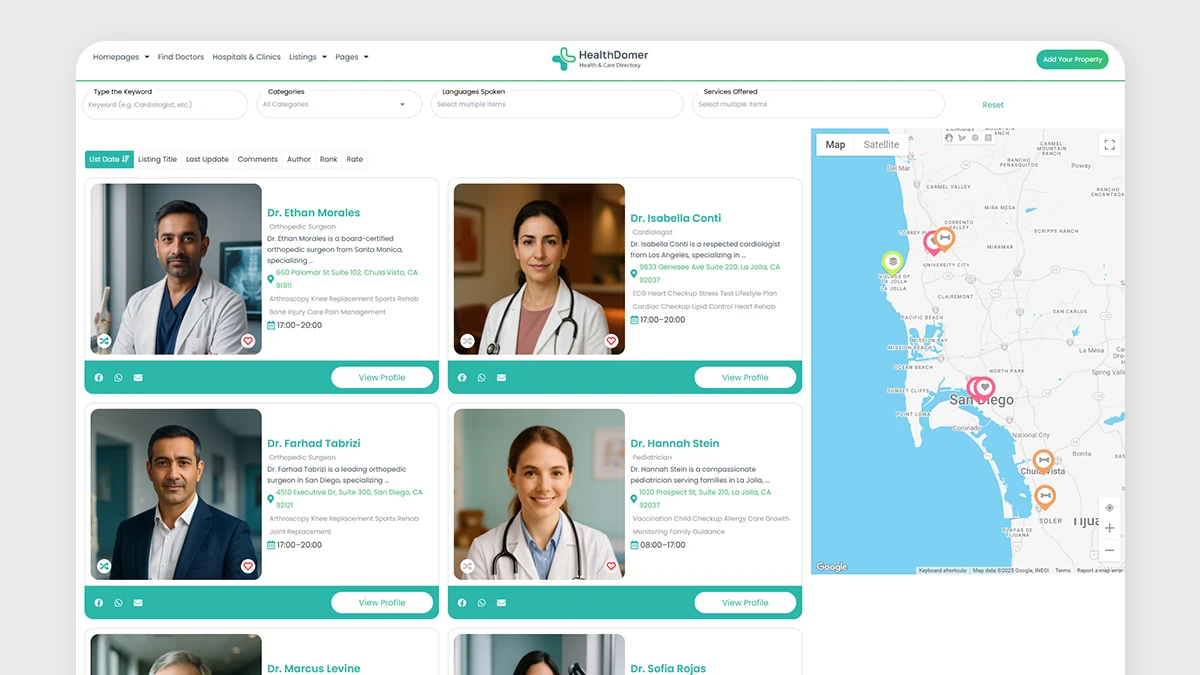
This page should help visitors compare listings.
Useful elements include:
- listing cards
- category or specialty
- location
- short description
- contact action
- map marker, if location matters
- important custom fields
- filters
Map-based directory page
A map layout is useful when users care about distance and local discovery.
This can work well for clinics, hospitals, dental offices, diagnostic centers, pharmacies, and local healthcare services.
Single listing page
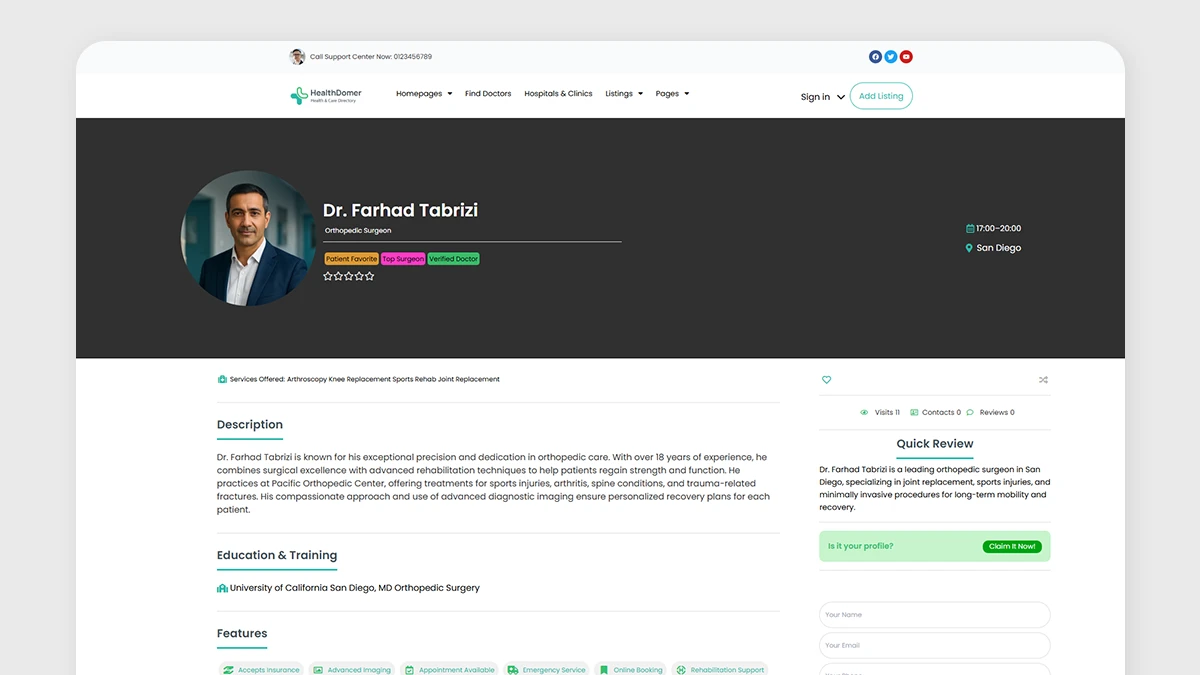
The single listing page is where trust and detail matter most.
A good healthcare listing page may include:
- provider or clinic name
- specialty
- address and map
- contact information
- services
- opening hours
- images
- custom fields
- reviews or ratings, if enabled
- booking or appointment action, if configured
- related listings or nearby options
For more on listing page planning, read How Single Listing Pages Work in Listdom.
Location and specialty archive pages
Archive pages can help users browse by specialty or area.
For example:
- dentists in Toronto
- dermatologists in Barcelona
- clinics in Downtown
- hospitals in Manchester
This can support both user experience and SEO when the structure is planned carefully.
Common mistakes to avoid
Treating a healthcare directory like a simple business directory
Healthcare visitors need more trust and detail. A simple name, image, and phone number may not be enough.
Mixing categories, specialties, and locations
Keep your structure clean. Categories should describe what the listing is. Locations should describe where it belongs. Addresses should describe the exact physical place.
Adding too many custom fields
More fields do not always create a better directory. Too many fields make submissions harder and can reduce data quality.
Ignoring moderation
Healthcare listings should be reviewed carefully, especially if users or providers can submit content from the frontend.
Publishing weak or unverified provider data
Incomplete provider data can reduce trust. Try to keep names, specialties, addresses, contact details, and service information accurate.
Making search too complicated
Healthcare search should be helpful, not overwhelming. Start with the most important filters, then expand based on user behavior.
Forgetting mobile users
Many visitors search for healthcare providers on mobile. Make sure search, maps, listing pages, contact buttons, and booking actions are easy to use on smaller screens.
Not testing map accuracy
If local search matters, test the map markers before importing many listings. Weak address data can make the whole directory feel unreliable.
Practical setup path with Listdom
Here is a practical path for building a healthcare directory website with WordPress and Listdom.
1. Define your healthcare directory model
Decide whether the directory will include doctors, clinics, hospitals, wellness providers, dentists, therapists, or a mix of listing types.
2. Plan your categories
Create a category structure that matches how users browse. This may include provider types, specialties, or healthcare service categories.
3. Plan your locations
Decide whether users will browse by country, state, city, district, neighborhood, or service area.
4. Decide your custom fields
Choose the healthcare-specific fields that support search, trust, and comparison.
Examples include specialty, insurance, languages, appointment type, opening hours, accessibility, and online consultation availability.
5. Configure maps if local discovery matters
If users need to find nearby providers or clinics, plan addresses, coordinates, map provider settings, and map-based layouts.
6. Create search forms
Use Listdom → Search and Filter Builder to create search forms that match healthcare search behavior.
Start with the most important filters: keyword, specialty, location, address, and selected healthcare-specific fields.
7. Create display pages
Use Listdom display layouts and shortcodes to show listings on your directory pages.
You may need a main directory page, specialty pages, location pages, a map-based page, and single listing pages.
8. Set up frontend submission if providers will participate
If doctors or clinics should manage their own profiles, plan login, registration, frontend dashboard, submission forms, and moderation.
9. Add monetization only after the workflow is clear
Choose monetization based on the directory model. Paid listings, memberships, featured profiles, claim listings, and booking-related workflows all require different planning.
10. Test with sample listings before launch
Create a few realistic sample listings. Test search, filters, maps, mobile layout, listing pages, submission flow, and moderation before publishing many listings.
What to read next
To continue planning your healthcare directory, read these related Listdom guides:
- How Listings, Categories, and Locations Work in Listdom
- How Maps and Addresses Work in Listdom
- Locations vs Addresses in Listdom
- How to Create Search Forms in Listdom
- How the Listdom Frontend Dashboard Works
- How to Monetize a Directory Listing Website
Conclusion
A healthcare directory website needs structure, accuracy, and trust.
Visitors are not only browsing listings. They are trying to find the right doctor, clinic, hospital, specialist, or healthcare service for a real need. That means your directory should help them search clearly, compare providers, understand locations, and contact or book with confidence.
Listdom gives WordPress users a practical foundation for building that kind of directory. You can organize healthcare listings with categories and locations, add structured fields, display addresses and maps, create search forms, support frontend submission, moderate listings, and connect monetization workflows where appropriate.
Start with the directory model first. Decide what each listing represents. Plan categories, locations, fields, maps, and search before adding hundreds of listings. Then build the user workflow around trust, clarity, and useful discovery.
That is how a healthcare directory becomes more than a list of names. It becomes a real directory system.
FAQ
Can I create a healthcare directory website with WordPress?
Yes. You can create a healthcare directory website with WordPress by using a directory plugin such as Listdom to manage listings, categories, locations, custom fields, maps, search forms, and listing pages.
What should a doctor or clinic listing include?
A doctor or clinic listing can include the provider name, specialty, description, address, map location, contact details, opening hours, languages, insurance, appointment options, images, and other custom fields relevant to your directory.
Can users search by specialty and location?
Yes. A healthcare directory can be structured so users search by specialty, category, location, address, and other custom fields depending on how the search form is configured.
Should a healthcare directory use maps?
Maps are useful when visitors need to find nearby clinics, hospitals, doctors, pharmacies, or healthcare services. For accurate map display, listings should have reliable address and coordinate data.
Can doctors or clinics submit their own listings?
Yes. A healthcare directory can allow providers to submit or manage listings through frontend submission and dashboard workflows. For healthcare content, moderation is strongly recommended before publishing submitted listings.
Can a healthcare directory include reviews?
A healthcare directory can include reviews or ratings where the site owner chooses to enable that workflow. Reviews should be moderated carefully because healthcare information, reputation, and privacy are sensitive.
Can a healthcare directory be monetized?
Yes. Healthcare directories can be monetized through paid profiles, membership packages, featured listings, claim listing workflows, advertising, sponsorships, or booking-related workflows where appropriate.
Is Listdom only for business directories?
No. Listdom can be used for many directory models, including healthcare directories, local business directories, real estate directories, restaurant guides, service provider directories, classifieds, hotel directories, and city portals