
You do not have to replace your WordPress theme just to build a Listdom directory. Listdom provides the directory functionality; the theme supplies the site’s presentation and surrounding structure. Listdomer is a directory-focused option, while another suitable theme may already serve your project well.
The decision is therefore about the whole website, not only which demo looks closest to a directory. An existing publication may need to preserve its editorial design and navigation. A new city guide may benefit from a directory-oriented starting point. This guide helps you compare those situations with real pages, dependencies, and maintenance work in view.
Separate the directory engine from its presentation
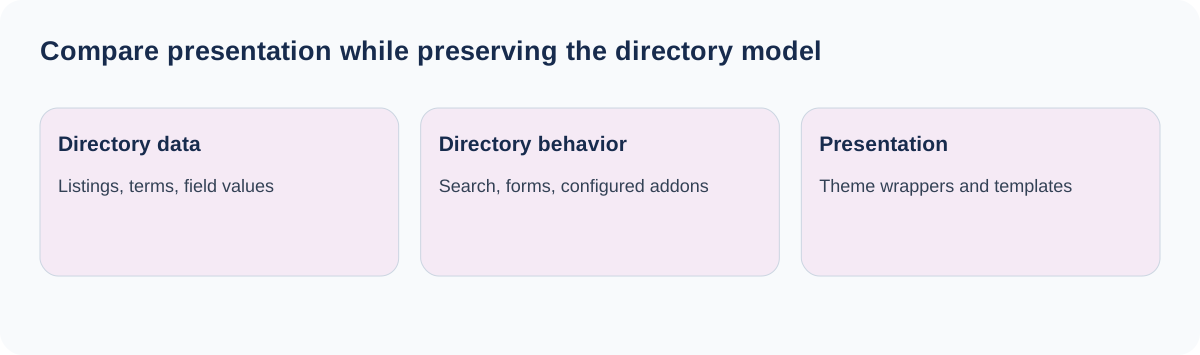
Listdom manages listing records, directory taxonomies, saved layouts, search forms, and the relevant directory workflows. Add-ons provide particular capabilities such as bookings, memberships, or page-builder integration. The theme controls the broader visual environment: headers, footers, page wrappers, typography, navigation, and related site presentation.
Listdomer is designed around Listdom directory websites, but it does not make the plugin unnecessary. Likewise, choosing a different theme does not remove the need to configure listing data, search destinations, frontend forms, and permissions.
| Decision | Main responsibility |
|---|---|
| Which information a listing stores | Listdom and the chosen data model |
| How visitors filter directory results | Listdom forms, layouts, and relevant add-ons |
| Site header, footer, and overall navigation | Theme and any chosen site builder |
| Single-listing elements and directory templates | Listdom’s display configuration and applicable integrations |
| Booking, claim, or membership rules | Their corresponding configured Listdom products |
This division keeps the comparison fair. Do not choose a theme expecting it to supply an unrelated paid workflow, and do not reject a theme because a plugin-level setting has not been configured.
Keep an existing theme when it already supports the site
If your website has an established visual identity, a working editorial system, and navigation visitors understand, keeping the current theme can reduce unnecessary change. A directory may be one part of a larger site rather than the site’s entire identity.
For example, a regional magazine can add local business listings while retaining its article layout and editorial homepage. Replacing the whole theme to obtain one directory demo could create more work than embedding saved Listdom output into the existing page design.
Keep the theme when it provides suitable content widths, reliable responsive behavior, and an integration path you can maintain. Test the actual directory pages before deciding it is a poor fit. A narrow container, duplicate page title, or unwanted sidebar can sometimes be addressed by the page layout rather than a theme migration.
This is not a promise of identical behavior with every theme. Custom overrides, builder conditions, unusual page templates, and optimization settings can affect the result. Compatibility is something to verify with your site, not a reason to skip testing.
Choose Listdomer when the directory should shape the foundation
A new directory-first project can benefit from a theme designed around listing and directory presentation. Listdomer provides its own theme settings, directory-oriented structures, and demo workflow. That can give a team a more relevant starting point than adapting a general-purpose design from scratch.
The practical advantage is reduced presentation planning when the supplied approach already fits the project. A city portal, local business directory, or niche listing site may want its navigation and page composition centered on discovery and submission from the beginning.
Review the actual Listdomer theme scope and current edition before deciding. A theme demonstration can include plugin content and optional products; do not assume every visible feature belongs to the theme itself or is included in every edition.
Listdomer uses Listdomer Core for its theme features and related administration tools. Treat that dependency separately from the Listdom directory plugin and its add-ons. Keeping a short dependency inventory makes future updates and handoff much clearer.

Compare the pages your project really needs
Build a small evaluation set instead of comparing homepages alone. Include a directory landing page, filtered results, a long single listing, a sparse single listing, the owner dashboard, and the site’s important ordinary content pages.
For each, record what should happen and which layer controls it. A beautiful homepage is not sufficient if the listing page becomes cramped, an owner form is difficult on mobile, or the site’s established article layouts require rebuilding.
Use representative content. Long business names, multiple categories, realistic contact data, and missing optional images reveal more than perfectly curated demo entries. Check text contrast, navigation, the width of forms, and the way content stacks on a phone.
Include a full visitor journey: find a category, narrow the list, open an option, and use the relevant next action. Then test the owner’s journey: sign in, add or edit a record, save it, and understand its status. The theme decision should preserve both experiences.
If the directory structure is still undecided, settle that first using the structure-before-design guide. A theme cannot compensate for unclear categories or a submission form that asks for the wrong information.
Evaluate builder and template ownership
If the site already uses a page builder, identify what it owns. It may control ordinary landing pages, the header and footer, or listing-specific templates through an integration. Avoid assigning the same responsibility to multiple competing templates without a clear precedence plan.
Listdom’s saved listing layouts can be placed in appropriate WordPress or builder content areas. Custom single pages, cards, and map infowindows have their own supported template workflows. Choosing a theme is therefore not the same as choosing all directory templates.
A project using Bricks must consider Bricks’ own theme and template model. Do not propose stacking two active WordPress themes to combine their designs. Elementor and Divi also have their own integration paths; verify the exact workflow instead of treating all builders as interchangeable.
For the directory page’s control layers, see how single listing pages work. Use one deliberate owner for each layout responsibility, and write it down for the person who will maintain the site.
Preview a theme change on a staging copy
For an existing website, create a staging copy and a verified backup before testing a different theme. Take screenshots of key pages, record menu assignments and important widget areas, and note custom templates or overrides.
Install or preview the candidate through Appearance → Themes using the normal WordPress workflow. For Listdomer, follow its installation and setup documentation, including Listdomer Core. Do not import demo content into a live populated site simply to see what the design looks like.
After activation on staging, check menu locations, headers, footers, page widths, titles, widgets, and any builder assignments. Theme-specific settings and widget areas may need reassignment. Keep the directory data test separate: confirm the same listing records still exist and their configured workflows still behave correctly.
Compare the evaluation set with your baseline. If something fails, identify whether it is the theme wrapper, a missing dependency, a stale template override, or a plugin setting. That evidence is more useful than concluding that a candidate is incompatible because one imported page looks different.
Account for migration and maintenance work
The cost of a theme choice includes implementation time, support effort, dependencies, and the amount of custom design your team must maintain. A theme that saves time today can still be a poor fit if future editors cannot understand how the site is assembled.
Keeping an existing theme avoids some migration work but may require directory-specific styling. Listdomer can provide a closer starting point but may require adapting ordinary content pages or changing an established design system. Compare those actual tasks rather than assuming one approach is always faster.
Use a child theme for appropriate code-level customizations and keep a record of template overrides. Updates should not depend on remembering undocumented edits made directly to a parent theme. Recheck the key visitor and owner journeys after relevant theme, builder, or plugin updates.
If a team or agency will hand off the project, include a short map: theme settings live here, directory queries live in saved shortcodes, forms live in the builder, and listing templates are assigned here. A maintainable setup is one another person can operate without guessing which tool controls each page.
Keep discovery and performance claims grounded
Neither a theme name nor a polished demo guarantees search rankings, AI visibility, or conversion. Useful directory content, accessible navigation, readable text, accurate metadata, and appropriate technical configuration all contribute to the public result.
Check that important listing facts remain understandable in the final page, including when optional images or fields are absent. A design that turns every detail into decorative graphics can make information harder to read and maintain. Keep the directory’s structured data and AI visibility configuration in the relevant Listdom settings rather than attributing them to the theme.
Measure performance with your actual hosting, content, maps, images, and active integrations. A lightweight homepage test does not represent a map-heavy search results page. Use comparable content and the same environment when assessing alternatives.
The directory website SEO checklist is a useful follow-up after the design works. It helps evaluate the public directory as a collection of useful pages, rather than treating the theme switch itself as an SEO strategy.
Make the decision from the test results
Choose the current theme when it meets the site’s broader needs and the directory works well inside it. Choose Listdomer when its directory-oriented foundation fits the project and reduces work you would otherwise maintain yourself. Choose neither on the strength of a single screenshot.
Before approving the decision, confirm the evaluation pages, required dependencies, mobile journeys, update responsibilities, and rollback plan. For a fresh project, carry that decision into the WordPress directory setup guide. For an existing site, keep the successful staging configuration as the reference for a controlled rollout.
FAQ
Is Listdomer required to use Listdom?
No. Listdom provides the directory functionality and can be used with other suitable WordPress themes. Test the actual site and integrations you intend to use.
Does Listdomer replace the Listdom plugin?
No. The theme supplies presentation, while Listdom remains the directory engine. Listdomer Core supplies the theme’s own supporting features.
Should I change themes just to add a business directory?
Not automatically. Test saved Listdom output within the existing theme first, especially when the directory is one part of an established website.
Does every feature in a theme demo come with the theme?
Do not assume so. Verify the current theme edition, plugin dependencies, and any optional add-ons used in that demonstration.
Can I test a theme without risking the live directory?
Use a staging copy with a verified backup and a small set of representative public and owner journeys. Record menu, widget, and template assignments before testing.
Will a theme switch improve AI discovery automatically?
No. Clear public content, maintained listing data, crawlable pages, and the relevant Listdom visibility configuration still need attention.