
Directory website SEO depends on which pages deserve to be found and whether those pages help people choose. A directory can generate thousands of URLs without creating thousands of useful search results. The strongest starting point is a clear relationship between individual listings, category pages, location pages, and the editorial guides that connect them.
This checklist helps you audit that relationship in a WordPress directory built with Listdom. It covers content, internal links, filtering, technical discovery, structured data, and AI-readable publication. Use it to find the most consequential gaps first. It is a practical review process, not a promise that a particular setting will produce rankings, rich results, or AI citations.
Start with the pages that have a distinct purpose
Before optimizing titles, make an inventory of the page types visitors should find. A listing page describes one entity. A category page helps someone compare a type of listing. A location page organizes options for a place. An editorial guide answers a question that needs explanation or curation.
Decide which of those purposes exist in your current inventory. A category with one thin record may not yet support the same public promise as a well-maintained collection with several meaningful choices. A neighborhood guide needs more than the city guide’s text with the place name replaced.
| Page type | Main question it should answer | First audit check |
|---|---|---|
| Single listing | Is this business, place, or provider relevant to me? | Identity, current facts, useful next step |
| Category archive | Which options fit this type of need? | Coherent collection and meaningful distinctions |
| Location archive | What relevant options exist in this area? | Accurate coverage and geographic context |
| Editorial guide | How should I evaluate or explore these choices? | Original criteria and links to relevant records |
| Filtered results | Which records fit my selected criteria? | Useful visitor behavior and deliberate crawl policy |
Choose a few representative URLs from each important type. Inspect them as a logged-out visitor, not only through an administrative preview. This reveals missing content, unexpected access restrictions, and confusing page relationships early.
For acquisition and promotion beyond organic search, use the directory traffic-growth guide. This checklist concentrates on the pages and technical decisions that support discovery.
Audit listing pages for useful, current information
Each listing needs a clear identity and enough detail to support the visitor’s next decision. Check the name, relevant services or attributes, location or service area, contact route, images where appropriate, and the context that distinguishes the entity from nearby alternatives.
Do not confuse word count with usefulness. Some listings require a detailed description; others need a shorter explanation plus well-structured practical facts. Repeating a generic promotional paragraph across hundreds of records adds little to a person’s comparison.
Inspect high-impact fields closely. A wrong phone number or map position can make a beautifully written page fail its purpose. Check separate branches carefully and preserve the differences that determine where someone goes or whom they contact.
Use Listings → Add New Listing or the existing listing editor to review the underlying record. Keep an internal note of the source and what was checked when information changes. The public page should accurately represent the record rather than contain a different, manually patched version of the facts.
Review images for relevance, permission to publish, readable sizing, and descriptive alt text. An image’s description should explain what it shows; repeating a location keyword does not help a person who cannot see it.
Build categories and locations that represent real choices
Taxonomy archives can organize a large directory into understandable collections. Their value comes from the records and navigation they provide, not simply from having a keyword in the URL.
Manage the terms under Listings → Categories and Listings → Locations. Use categories for what the listing is or offers, and locations for geographic grouping. Keep naming and hierarchy consistent enough that editors and submitters can make the same assignment.
Review the actual archive output. A term description stored in WordPress may not appear in the layout you selected. If visitors need explanatory context, verify that the theme or template displays it appropriately, or create an editorial page with a distinct purpose and clear links.
Listdom’s archive layout options are under Listdom → Settings → General → Archive Pages. The chosen shortcode and theme wrapper affect the result. Per-term archive options can depend on the active product setup; test their precedence before assuming a child location automatically inherits a parent term’s custom layout.
The taxonomy archive guide explains how these pages fit the directory. Audit the public URL after configuration instead of treating a saved setting as proof of a useful archive.
Avoid multiplying near-identical location pages
A large geographic coverage plan can create more pages than the directory can support. Before creating every category-and-location combination, ask whether each one has enough real records or distinct information to help its intended visitor.
For example, a guide to plumbers in one neighborhood should not automatically become dozens of neighborhood pages with the same providers and interchangeable text. If those businesses serve the whole city, a city-level page with clear service-area information may answer the question more honestly.
Maintain important local distinctions when they are real. Separate branches, travel boundaries, opening arrangements, or neighborhood access can justify different information. The editorial test is whether a person choosing between those pages would learn something useful.
Consolidate overlapping content when it serves the same purpose. Plan URL changes carefully, including relevant redirects and internal-link updates. Do not assume that removing a page, changing a taxonomy, or editing a slug automatically preserves every incoming link.
Treat filter URLs as a separate technical decision
Search and filters help visitors narrow records. They can also create many URL combinations, particularly when criteria are represented in query parameters. Not every usable results state needs to become an independent organic landing page.
Review how your actual installation creates and links these URLs. Identify which pages you deliberately want crawled and indexed, and which combinations are mainly interactive search states. Include sorting, pagination, empty results, and repeated parameters in that review.
Google’s guidance on faceted-navigation crawling explains why large combinations can consume crawl resources. It also distinguishes ways of managing crawl access and canonical preferences. Apply a policy appropriate to the site’s real URL patterns rather than copying a generic robots rule.
Crawl blocking and removal from search results are different controls. A robots rule can prevent a crawler from fetching a page and seeing instructions within it. Coordinate robots directives, indexation settings, canonicals, sitemaps, and links with the person responsible for the site’s SEO configuration.
Listdom provides search behavior; the surrounding WordPress theme, SEO plugin, server, and custom code can also influence the resulting signals. This checklist does not imply that Listdom automatically chooses the correct indexation policy for every possible filter combination.
Make important pages reachable through ordinary links
A visitor should be able to reach key categories, locations, and listings through a sensible navigation path. Avoid making the only route depend on a search form submission, an account, or a scripted interaction whose output has not been checked.
Use descriptive links between relevant pages. A neighborhood guide can link to the places it discusses. A category archive can link to listing details. A listing can lead back to the collection a visitor needs to continue comparing.
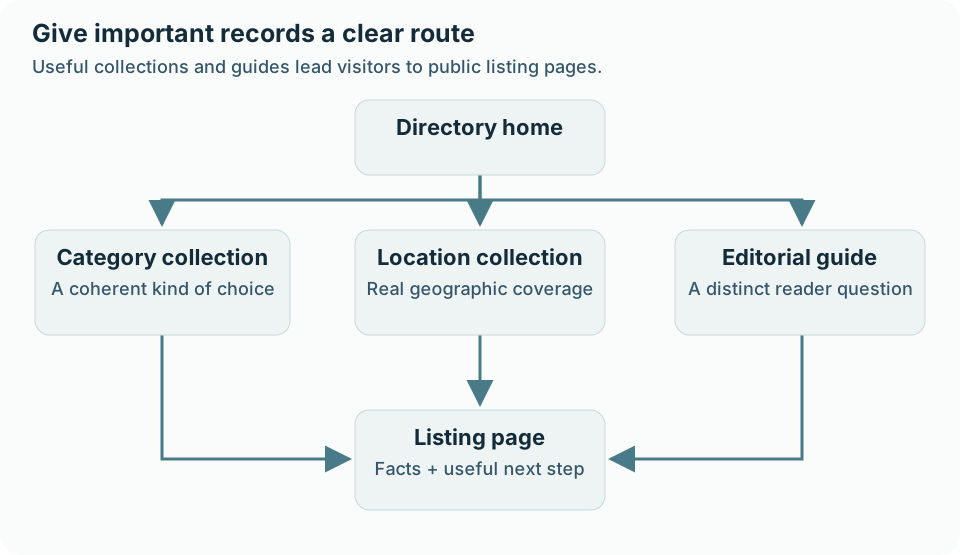
Keep internal links focused on the reader’s next task. Adding every related taxonomy to every page can create clutter without clarifying the structure. The text around a link should explain why the destination helps.
Inspect pagination and later result pages too. A large collection may look complete from page one while records deeper in the set are difficult to reach. Confirm that important records have accessible URLs and that the intended navigation works on mobile.
Use an accurate sitemap as another discovery aid, then verify what it includes. Submission does not guarantee indexing. Sitemaps should support a coherent site structure rather than compensate for broken or missing links.
Write titles and summaries that match the page
Give each important page a concise, descriptive title that communicates its purpose. A listing title should identify the entity; a collection title should describe the meaningful type or area it covers. Include the core topic naturally without repeating variations for their own sake.
Align the visible main heading, SEO title, description, and body. They can use different wording, but they should describe the same page. If a category page contains service providers across the whole city, do not title it as a precise neighborhood shortlist unless the content supports that claim.
Descriptions should help someone understand the result and decide whether to visit. They are not a place to promise rankings or add claims missing from the page. Avoid applying the same generic summary to all locations.
Google can generate title links using several page and link signals, so exact snippet display is outside your control. Its title-link documentation supports clear, accurate titles rather than a formula based on keyword density or a fixed character guarantee.
Check structured data against visible public facts
Structured data gives compatible systems an explicit description of page information. In Listdom, review Listdom → Settings → SEO & GEO → Structured Data and the Structured Data option. Then inspect a public listing and an appropriate collection page.
Choose category schema types that actually describe the entities. A business should not be presented as an event merely because an Event type seems attractive. Check custom-field schema properties only where they represent the right concept.
Validate representative public pages and review active SEO plugins, theme code, and snippets for conflicting descriptions of the same entity. More markup is not automatically better. Keep one coherent representation of the listing rather than several incompatible versions.
The structured-data and AI visibility guide explains Listdom’s output and publication controls. Empty fields, invalid values, public visibility, and active add-ons can all affect what is available.
Structured data does not turn an inaccurate source into a verified fact. It also does not guarantee rich results, a ranking improvement, or a citation. Check the underlying record before troubleshooting the markup.
Make a deliberate choice about AI-readable publication
Public pages may be encountered by search engines, answer systems, or compatible clients. Reliable, specific information and clear links remain useful across those routes. There is no need to replace readable guidance with a page written only for machines.
Under Listdom → Settings → SEO & GEO → AI Visibility, review the optional Public AI Feed, its public field choices, and discovery hints. Treat these as additional publication decisions. Select information you intend to make publicly reusable and inspect the response as a logged-out visitor.
Do not expose internal review notes or assume that hiding a visual element makes its underlying value private. Review the applicable visibility settings and the feed output. Keep the page facts, structured data, and any selected public feed consistent.
Google’s current AI search guidance requires indexed, snippet-eligible pages and inclusion in Search generative AI features through Search Console. No special AI schema or public directory feed is required. Google Search ignores llms.txt; Listdom’s optional discovery files serve compatible other clients, not a guaranteed Google visibility benefit. Inspect the owner’s platform settings without treating crawl permission, training permission, and appearance in an AI answer as one control.
Review technical access and the mobile journey
Check representative URLs for successful responses and the correct content. Confirm that WordPress’s Settings → Reading → Search engine visibility matches whether the site is intended to be discoverable. A staging copy and a public production directory should have deliberate, different publication decisions.
Review the site’s canonical URLs, redirect behavior, and any access requirements. If important public pages unexpectedly redirect to login or return an error, fix that before spending time on descriptive metadata.
Then use the page as a mobile visitor. Can someone read the record, adjust a filter, open a listing, and reach the next step without losing context? Check image sizes, awkward layout shifts, obstructive overlays, and usable controls.
Performance improvements should support the real page. Test representative map views and image-heavy records rather than only the homepage. Avoid disabling assets or features solely to improve a score if doing so breaks the directory journey.
Measure by page type and problem
Use Search Console and relevant site analytics to understand which pages are discovered and used. Group listings, category archives, location archives, and editorial guides rather than treating all organic visits as one undifferentiated number.
A page with impressions and few clicks raises different questions from a useful page that search systems have not discovered. The first may need a better match between query, title, and content. The second may need an access, linking, sitemap, or indexation review.
Separate the measures before judging a change. Search impressions show exposure, clicks show visits from a result, AI citations show attributed use in a supported answer system, and conversions show the relevant next action. A directory may receive more citations without more visits, and more visits without more useful inquiries. Bot requests alone establish none of those outcomes.
Use the first-party reports available to the actual site. Search Console’s Generative AI performance report describes AI exposure within its documented scope; Bing Webmaster Tools’ AI Performance report provides citations and sampled grounding queries across supported Microsoft and partner experiences. Neither is a census of every assistant. For third-party prompt tracking, keep the prompt set, market, platform, and reporting method consistent before comparing periods.
Record one improvement hypothesis, such as making an important category reachable from the setup guide, and a relevant baseline. Compare qualified visits and the intended action alongside visibility. If analytics access is unavailable, record that limitation rather than inventing a benchmark or delaying a useful correction.
Compare trends with changes to inventory and publication policy. Adding many new pages, changing URLs, or altering filter behavior can affect the data. Record those changes so the team can investigate a concrete cause instead of attributing every fluctuation to a plugin setting.
Do not interpret a single short period as proof of success or failure. Confirm whether the page was crawled, whether its intended content is present, and whether it serves the visitor task before rewriting it again.
Prioritize the checklist into a working plan
Start with problems that prevent access or mislead visitors. Broken important pages, wrong business details, and accidental publication restrictions deserve attention before polishing low-impact metadata.
Next, improve the core collections: useful listing records, coherent categories, meaningful locations, and dependable internal links. Then review filter URL governance, canonical signals, structured data, and any optional public AI feed.
Give each issue a page example, an owner, an expected outcome, and a way to verify the result. “Improve SEO” is too broad to complete. “Make the clinic category reachable from the relevant guide and confirm the public archive shows current records” is something a team can implement and review.
| Priority | Example issue | Evidence that the work is done |
|---|---|---|
| Access and trust | Important listing fails or has wrong contact details | Correct public response and reviewed facts |
| Collection quality | Location page promises coverage it lacks | Useful collection or a revised page purpose |
| Navigation | Relevant records are difficult to reach | Working descriptive links and pagination |
| Technical governance | Uncontrolled filter combinations | Tested crawl and indexation policy |
| Machine-readable output | Conflicting listing descriptions | Validated, consistent public output |
FAQ
Does every directory listing need a long description?
No. It needs enough original, accurate information to support its visitor task. Use the detail the entity requires; avoid padding many pages with interchangeable text.
Should every filter combination be indexed?
No. Decide which combinations have a distinct public purpose and review the technical cost of exposing large URL spaces. Visitor filtering and organic landing-page design are related but separate decisions.
Can Listdom structured data guarantee rich results?
No. It describes supported public information, while outside search systems decide whether and how to use it. Validate the output and check that the underlying facts are correct.
Are category and location pages automatically valuable for SEO?
Their value depends on useful inventory, clear intent, navigation, and accessible output. An empty or near-duplicate archive does not become useful simply because it exists.
Do AI discovery files replace normal SEO?
No. Maintain useful, accessible pages and accurate records. Optional discovery hints can describe available information to compatible systems without guaranteeing retrieval or citations.
Where should a new directory start?
Choose a focused inventory, establish reliable records, create meaningful collections, and make those pages reachable. Review technical access before expanding into many location or filter pages.