Before you begin, it helps to understand why taxonomy archive pages matter earlier than many users expect. This guide explains the topic in practical terms and connects it to the decisions, setup, or Listdom workflow covered below.

Before you begin, it helps to understand why taxonomy archive pages matter earlier than many users expect. This guide explains the topic in practical terms and connects it to the decisions, setup, or Listdom workflow covered below.
Why taxonomy archive pages matter earlier than many users expect
A lot of beginners think only in terms of:
- pages
- shortcodes
- search forms
- single listing pages
That makes sense at first, but it leaves out an important layer.
Taxonomies can create their own browsing paths.
That matters because taxonomy archive pages affect:
- how users browse categories and locations
- how search results and manual pages relate to the rest of the site
- how much manual page-building you really need
- whether your directory structure feels natural or overbuilt
- how easy it is to scale the front-end experience later
If you understand taxonomy archives early, you can avoid creating unnecessary manual pages for every category or location.
Build with Listdom
Build your directory website with Listdom
Launch a polished WordPress directory with listings, locations, maps, search, and room to grow into a full directory business.
Start with one simple mental model
If you only remember one thing, remember this:
- a taxonomy archive page is an automatically generated archive-style page for a taxonomy term
- a shortcode page is a page you build manually in WordPress and control more directly
- a search results page is a page used mainly to show searched or filtered listings
- a single listing page is the automatically created detail page for one published listing
That means taxonomy archives are one of the built-in browsing layers of the directory, not a separate manual page-building system.
If you need the broader relationship between pages, shortcodes, search forms, and archives first, see How Listdom Shortcodes, Search Forms, Archives, and Pages Work Together. That article explains the whole front-end page system, while this one focuses specifically on the taxonomy archive layer.
What a taxonomy archive page is in Listdom

A taxonomy archive page is a front-end archive page for one taxonomy term.
In practical terms, that means users can open a term such as:
- a category
- a location
- a feature
- a label
- a tag
and land on a page that shows listings connected to that term.
Examples:
- a Restaurants archive page
- a Barcelona location archive page
- a Pet Friendly feature archive page
- a Featured label archive page
- a Luxury tag archive page
These pages are not usually created by manually making a WordPress page and inserting a shortcode for each term.
They are part of the natural archive behavior of the taxonomy itself.
That is why taxonomy archive pages are often the fastest way to create a useful front-end browsing path.
Which taxonomies can have archive pages
In Listdom, the practical archive candidates usually include:
- Categories
- Locations
- Features
- Labels
- Tags
The most important ones for most sites are usually:
- categories
- locations
That is because those two often carry the strongest browsing logic.
Features, labels, and tags can also create archive-style browsing paths, but whether you should rely on them that way depends more on the site model.
If you need the structural meaning of those taxonomies first, these articles are the best companions:
- How Listings, Categories, and Locations Work in Listdom
- How Labels, Features, and Tags Work in Listdom
Why taxonomy archive pages feel different from manual pages
This is where many users pause.
A taxonomy archive page can look like a normal front-end listings page, but the logic behind it is different.
A manual page usually works like this:
- create a WordPress page
- insert a shortcode
- optionally connect a search form
- publish the page
A taxonomy archive page works more like this:
- create the taxonomy term
- assign listings to that term
- let the taxonomy generate its own archive-style browsing path
That means the taxonomy archive depends more on:
- the taxonomy structure
- the assigned listings
- the archive behavior of the plugin
and less on manual page-building.
The biggest practical difference: archive pages vs shortcode pages
A shortcode page gives you more intentional design control.
A taxonomy archive page gives you a faster and more natural archive path.
That difference is easier to understand like this:
Taxonomy archive pages are better when you want:
- a normal archive-style page for a category or location
- a faster browsing path without building many manual pages
- a structure that grows naturally with your taxonomy terms
- a cleaner default archive experience
Shortcode pages are better when you want:
- a custom landing page
- a page with mixed content blocks, not only archive output
- tighter control over layout and page structure
- a page with its own search form and display logic
- a more designed or marketing-oriented page
- a page built around a more specific filtered collection, not only one taxonomy term
That last point matters more than many users expect. A shortcode page is often the better choice when you want to display a more custom set of listings, for example apartments with 5 bedrooms, a garage, a penthouse type, a verified label, and a specific location such as Alabama. That kind of page is much more specific than a normal taxonomy archive and usually belongs in a shortcode-based setup.
So taxonomy archives are often the faster default path, while shortcode pages are the more flexible custom path.
The most useful archive types for most directories
Not every taxonomy archive is equally important.
A practical beginner priority looks like this:
1. Category archives
These are usually the strongest archive pages in the whole directory.
They answer:
What kind of listings are on this page?
Examples:
- Restaurants
- Hotels
- Dentists
- Lawyers
These pages often become some of the most natural browsing paths on the site.
2. Location archives
These are usually the next most important archive pages.
They answer:
Which listings are in this place?
Examples:
- Barcelona
- Downtown Chicago
- California
- Madrid
Location archives are especially important when your site depends on local search, map discovery, or geographic browsing.
3. Feature archives
These can be useful when features behave like meaningful discovery paths.
Examples:
- Pet Friendly
- Free Wi-Fi
- Outdoor Seating
But they should only be treated as serious archive paths when visitors are likely to browse those attributes intentionally.
4. Label archives
n
These can work when a label represents a meaningful status or visibility path.
Examples:
- Featured
- Verified
- New
But labels often work better as visual signals than as the main browsing system, so this depends heavily on the project.
5. Tag archives
These are usually the loosest archive type.
They can exist, but they are often less central than category or location archives.
A practical rule is:
- treat category and location archives as the main archive system first
- use feature, label, and tag archives more carefully and only when they truly help discovery
How taxonomy archive pages fit into the full front-end system
A directory site usually has several front-end page types at the same time.
A useful mental map looks like this:
- taxonomy archive page = browse a term
- shortcode page = display listings in a manually designed way
- search results page = show filtered or searched listings
- single listing page = show one listing in detail
That means taxonomy archives do not replace the rest of the front-end system.
They sit beside it.
A user may move through the site like this:
- open a category archive
- narrow to a location archive or search flow
- open one listing
- land on the single listing page
So archive pages are often one of the main entry or browsing layers before the single listing page.
Implementation guide
Need the technical details?
Use the Listdom documentation to configure listings, shortcodes, search forms, maps, and add-ons with confidence.
How taxonomy archive pages depend on structure
A taxonomy archive is only as useful as the taxonomy behind it.
That is why archive quality starts with structure quality.
If your categories are too broad, overlapping, or inconsistent, the category archives will also feel weak.
If your locations are messy or too deep, the location archives will also feel weak.
That is why a good archive strategy starts with:
- clear category logic
- clear location hierarchy
- consistent listing assignment
If the structure is still unclear, you should fix that first before trying to judge whether the archive pages are good enough.
A practical example: when archives are enough
Let’s say you run a city directory.
You have:
- categories like Restaurants, Hotels, Dentists, and Shopping
- locations like Barcelona, Eixample, and Gràcia
In many cases, you may not need to build separate manual pages for every one of those terms.
The archive behavior already gives you a useful browsing system:
- a Restaurants archive
- a Barcelona archive
- other term-based archive paths
That can be enough for a large part of the directory’s normal browsing behavior.
In that kind of project, shortcode pages are often better reserved for:
- the homepage
- special landing pages
- featured collections
- more custom directory sections
A practical example: when a shortcode page is better

Now imagine you want a page that should:
- introduce a category with custom text
- include a hero area
- show a search form above the listings
- mix listings with other content blocks
- use a more controlled layout than a normal archive page
That is usually not the best job for a plain taxonomy archive.
That is a shortcode-page job. The same applies when you want a more intentionally filtered collection, not just a normal term archive. If the page should show a custom combination such as verified penthouses in Alabama with 5 bedrooms and a garage, a shortcode page is usually the better fit.
So the question is not which system is universally better.
The better question is:
Do I want a normal archive-style browsing page, or a more intentionally designed custom page?
Archive settings in Listdom General Settings
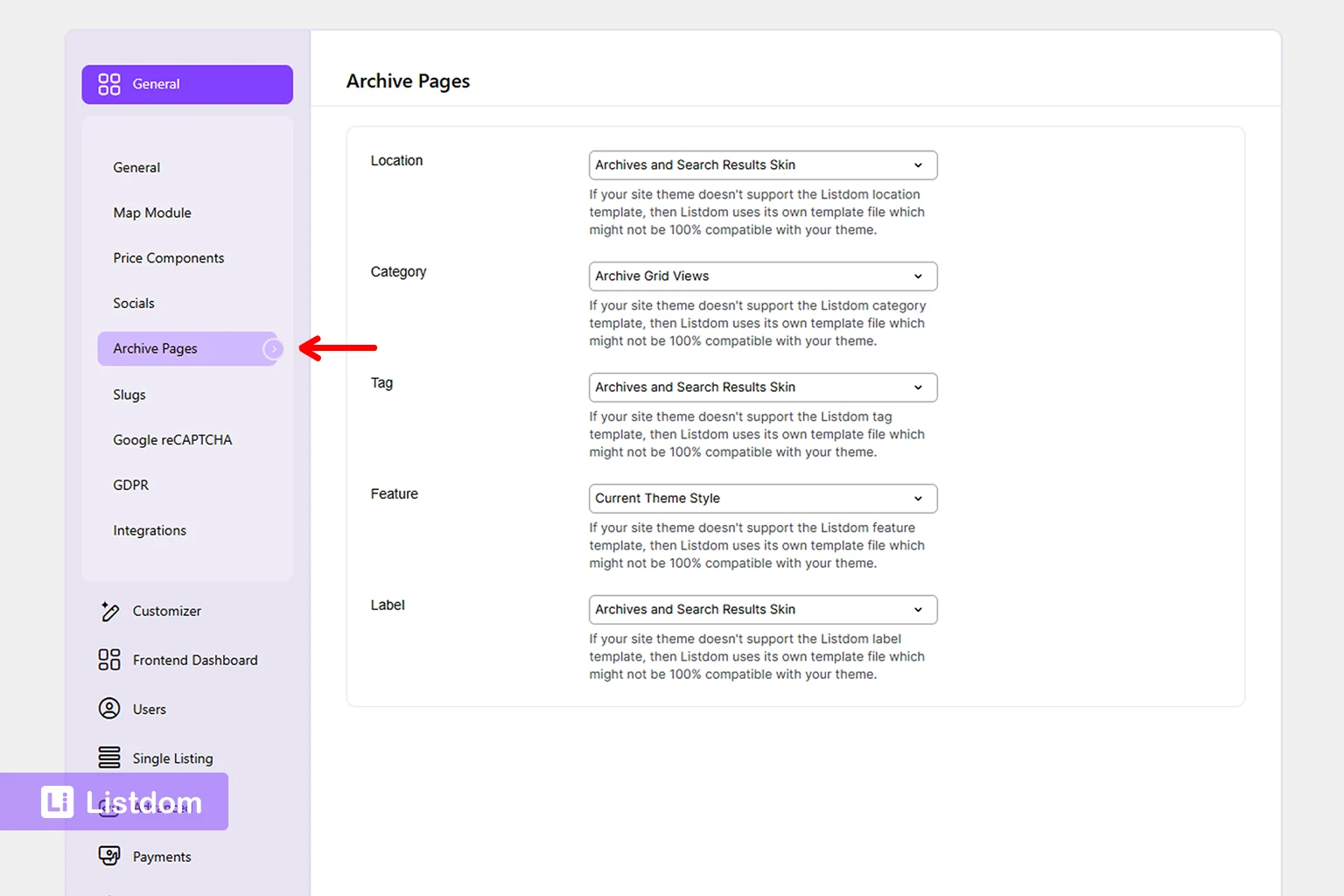
There is another practical layer that users should know here.
Taxonomy archive pages are not only about the taxonomy structure itself. They are also affected by the general archive-related settings in Listdom.
That matters because two sites may use the same categories or locations but still show archive pages differently depending on the archive settings.
In practical terms, this is the layer to review when you want to understand:
- how archive pages are displayed by default
- whether the archive output feels too plain or too busy
- how archive pages fit with the rest of the front-end browsing experience
- whether the archive behavior feels aligned with your shortcode pages and single listing pages
So even though taxonomy archives are generated naturally, they are not completely untouched by settings.
A good practical rule is:
- first make sure the taxonomy structure is strong
- then review the archive-related settings in Listdom → Settings so the default archive behavior matches the kind of browsing experience you want
This is also one reason you should not judge archive pages too early. If the structure is still weak or the general archive settings are not reviewed yet, the archive pages may look less useful than they really are.
If you need the broader settings layer behind this behavior, see How Listdom Settings Work: Global, Shortcodes, Search, and Add-ons. That article covers the wider settings model, while this article focuses on how archive pages behave as part of the browsing system.
How taxonomy archives relate to search forms
A search form can exist alongside taxonomy archives, but it is not the same thing.
A taxonomy archive is term-based browsing.
A search form is user-driven filtering or searching.
That means:
- a visitor may open a category archive without using a search form at all
- or may start from a search form and land on a results page instead of an archive
- or may use both in the same site depending on how the experience is built
So archive pages and search forms are related, but they solve different front-end needs.
What usually goes wrong
A few beginner problems appear very often here.
Mistake 1: creating manual pages for every category too early
This often creates unnecessary work.
In many cases, the taxonomy archive already gives you a usable front-end path.
Mistake 2: treating taxonomy archives and shortcode pages as the same thing
They can both show listings, but they are not the same page type.
Mistake 3: judging archive pages before the taxonomy structure is solid
If the categories or locations are messy, the archive pages will feel messy too.
Mistake 4: relying on weak taxonomies for important archive browsing
If tags or labels are too loose, their archives may not be very useful as core browsing pages.
Mistake 5: forgetting that single listing pages are another separate layer
Archive pages show many listings together.
Single listing pages show one listing in detail.
They should not be confused with each other.
How to decide whether to use archives or manual pages
A practical checklist helps here.
Use a taxonomy archive page when:
- the term itself is already a meaningful browsing destination
- you want the fastest normal archive path
- you do not need a heavily designed page for that term
- the taxonomy structure is already strong
Use a shortcode page when:
- you want more control over page structure or content
- you need a search form on the page in a more controlled way
- the page should act more like a landing page than a normal archive
- you want a more customized filtered experience, especially when the page should represent a specific combination of filters rather than one category or location term
In many real sites, you will use both.
What to configure first
A practical beginner order looks like this:
- define the categories and locations clearly
- assign listings consistently to those terms
- review whether the term archives already solve the browsing need
- only build extra shortcode pages where you truly need more control
- connect search forms and custom pages after the structure and archive logic are clear
That order prevents a lot of unnecessary manual page-building.
What to learn next
Once taxonomy archive pages are clear, the best follow-up topics are:
- How Listings, Categories, and Locations Work in Listdom
- How Listdom Shortcodes, Search Forms, Archives, and Pages Work Together
- How Single Listing Pages Work in Listdom
- How to Create Search Forms in Listdom
These articles help connect archive logic to the rest of the directory system.
Listdom ecosystem
Build the directory workflow described in this guide
Use related Listdom products, add-ons, and planning pages to turn this guide into a structured directory project.
Final thoughts
Taxonomy archive pages are one of the easiest Listdom concepts to underestimate.
They may look simple, but they can save a lot of manual page-building and create a much more natural browsing structure.
The key is to remember what they are really for:
- categories and locations usually create the strongest archive paths
- archive pages are great for normal browsing
- shortcode pages are better when you need more custom control
- search results pages and single listing pages are separate layers again
Once that relationship is clear, your front-end planning becomes much easier.
FAQ
What is a taxonomy archive page in Listdom?
It is an archive-style front-end page for a taxonomy term, such as a category, location, feature, label, or tag.
Do I need to create a WordPress page for every category archive?
Usually no. Taxonomy archive pages are part of the natural archive behavior of the taxonomy and do not usually require a separate manual page for each term.
What is the difference between a taxonomy archive and a shortcode page?
A taxonomy archive is a built-in term archive path. A shortcode page is a manually created WordPress page where you control the listings output more directly.
Are category and location archives the most important archive pages?
Usually yes. For most directories, they are the strongest and most useful browsing paths.
Can I use both taxonomy archives and shortcode pages on the same site?
Yes. In many real projects, archive pages handle normal browsing while shortcode pages handle custom landing pages or more controlled directory sections.
Are taxonomy archive pages the same as single listing pages?
No. Archive pages show multiple listings connected to a term, while a single listing page shows one listing in detail.
When should I build a shortcode page instead of relying on an archive?
When you need more design control, mixed content, a custom landing-page structure, or a more intentional search-and-display experience.
FAQ
Common questions
What is a taxonomy archive page in Listdom?+
It is an archive-style front-end page for a taxonomy term, such as a category, location, feature, label, or tag.
Do I need to create a WordPress page for every category archive?+
Usually no. Taxonomy archive pages are part of the natural archive behavior of the taxonomy and do not usually require a separate manual page for each term.
What is the difference between a taxonomy archive and a shortcode page?+
A taxonomy archive is a built-in term archive path. A shortcode page is a manually created WordPress page where you control the listings output more directly.
Are category and location archives the most important archive pages?+
Usually yes. For most directories, they are the strongest and most useful browsing paths.
Can I use both taxonomy archives and shortcode pages on the same site?+
Yes. In many real projects, archive pages handle normal browsing while shortcode pages handle custom landing pages or more controlled directory sections.
Are taxonomy archive pages the same as single listing pages?+
No. Archive pages show multiple listings connected to a term, while a single listing page shows one listing in detail.
When should I build a shortcode page instead of relying on an archive?+
When you need more design control, mixed content, a custom landing-page structure, or a more intentional search-and-display experience.