
The first 100 listings should make a directory useful for a particular audience. They are not simply a number to display on the homepage. A hundred unrelated records spread across dozens of places can leave every meaningful search empty, while a smaller, carefully chosen collection can already help someone compare real options.
To get your first 100 directory listings, work from a coverage plan: choose a narrow starting market, establish a publication standard, seed a small reviewed collection, and invite relevant owners to contribute. Listdom gives you several ways to bring information into that process, including manual entry, CSV imports, Business Data draft imports, and frontend submissions. The right route depends on your source and your ability to review it.
Decide what the first collection must help people do
Write one sentence describing a useful visit. For a neighborhood directory, it might be “find a bicycle repair shop serving the east side and contact it.” For a professional directory, it might be “compare independent bookkeepers who work with restaurants.” This sentence determines which businesses deserve a place in the first collection.
Then define the boundary. Choose the area, service types, and eligibility rules you can maintain. Avoid launching with every category that might someday attract traffic. Each new category creates another promise to visitors and another set of records to keep current.
A useful initial listing should answer the important questions for that task. Decide what is required before publication: identity, relevant service, location or service area, a usable next step, and enough context to distinguish it from alternatives. Images and long descriptions may help, but they cannot compensate for the absence of a working contact route.
If the site itself is still being assembled, start with the WordPress directory build guide. This article assumes you have a working place to store, review, and display your initial inventory.
Turn the target of 100 into a coverage plan
Break the total into the combinations visitors will actually use. Suppose you are launching a repair-service directory for one town. You might begin with four service groups across several neighborhoods, then identify where residents currently have too few credible options.
Do not distribute records evenly merely because a spreadsheet makes that convenient. Some neighborhoods have more providers, and some services naturally cover the whole town. Use the plan to expose gaps, then decide whether to recruit more providers or narrow the site’s promise.
| Planning question | Example decision | What it prevents |
|---|---|---|
| Who is the first audience? | Residents seeking home repair | Unrelated listings diluting the launch |
| Where does the first version work? | One town and a defined nearby area | A region-wide directory with thin coverage |
| Which choices matter? | Service, area served, contact route | Collecting details that do not help selection |
| What is a publishable record? | Essential facts checked and source recorded | A large inventory of unusable profiles |
| What is the next acquisition gap? | Too few evening repair providers | Recruiting more of what is already abundant |
“100” is a planning milestone, not a requirement to delay a useful launch. If 35 records satisfy the first visitor journeys and you can support them reliably, test that experience while continuing to recruit. If 100 records still fail those journeys, improve the coverage before promoting the count.
Build the first ten records yourself
Creating the first ten listings manually teaches you what the directory needs to ask. Choose a varied sample: a business with a physical storefront, a provider working across several neighborhoods, a record with limited public information, and an example with more detailed services.
In WordPress, use Listings → Add New Listing to enter and review the record. Assign the appropriate category and location, check the address and map position where relevant, and make the next step clear. Keep a separate source log so another editor can understand where the details came from.
Notice which questions slow you down. If every record needs a different interpretation of “service area,” clarify that field now. If the categories overlap so much that you cannot choose one consistently, fix the category model before inviting dozens of owners to use it.
Ask a few people from the target audience to find and compare options in this small collection. Their questions can reveal missing fields more effectively than adding every possible attribute in advance. Use the first ten records as a practical specification for the next batch.
Choose a source you can review and maintain
You can combine acquisition routes, but keep their roles clear. Manual research, a permissioned spreadsheet, a business-data service, and owner submissions offer different kinds of evidence and different maintenance costs.
Your own or a partner’s spreadsheet is useful when an association, client, or local organization already maintains the information. Agree what you may publish, when the source was checked, and who can correct it. Standardize the fields, then use Listdom’s bulk import workflow with a representative sample.
Webilia Business Data can help discover businesses and create selected draft listings. Open Listdom → Webilia Connect to connect the account, then Listdom → Import / Export → Business Data → Find Businesses. Choose the search area and business types, review the cost, inspect the results, and select appropriate businesses before creating drafts.
Business Data belongs to Listdom Core and uses Webilia Credits. It is distinct from the Google Places add-on. A new search is a paid action; requested result limits do not guarantee that many suitable businesses. Review the Business Data import documentation before using it.
Google Places offers a separate discovery route. The Google Places draft-creation guide explains its temporary queue, minimal drafts, and editor review. Those drafts still need native listing details and appropriate media before publication.
Owner submissions can supply details that public sources omit, such as specialties or service boundaries. They still require review. Do not interpret an owner’s willingness to submit as evidence that every claim is independently verified.
Avoid building the launch around indiscriminate copying. Keep the source, publication rights, and correction route understandable. Never present an imported profile as owner-approved unless that approval actually happened.
Move from ten to thirty through direct relationships
Once the first ten records work, recruit the next group deliberately. Start with businesses whose services fill identified gaps. A focused invitation is easier to understand than a generic request to join another website.
Explain who the directory serves, what information the profile will show, and how the business can correct it. Ask for the specific details you need. Be candid about the site’s stage: a new directory can offer a relevant, maintained profile and a clear launch plan without claiming an established audience it does not have.
A practical invitation can say: “We are building a guide to repair services in this town. Your business fits the appliance-repair section. Could you confirm your service area, public contact details, and the services customers can request?” Adapt that wording to your actual process and relationship.
Offer help with the first submission when appropriate. Early onboarding is research as well as acquisition: the owner who struggles with a confusing field is showing you something to fix before broader recruitment. Keep a record of invited, responded, submitted, and published businesses so a contact is not mistaken for a completed listing.
Give submissions a short, dependable path to publication
Create a clear entry point for contributing a listing. Explain eligibility, which information will be public, expected review time, and how to request corrections later. Do not ask for every optional detail merely because the plugin can store it.
Listdom’s frontend dashboard lets appropriate users submit and manage listings. Under Listdom → Settings → Frontend Dashboard → Add Listing → General, connect the configured dashboard page and review Listing Status. A standalone add-listing page and guest submission are Pro features with their own configuration.
Test the real account roles and any active membership-package rules before opening the form widely. A package’s auto-confirm behavior can change the publication result. The add-listing form guide explains the form setup, while the moderation guide covers the review layers.
Establish a review rhythm your team can sustain. If you can reliably review ten submissions a week, plan recruitment batches around that capacity. A backlog of unanswered submissions can damage trust before the directory has even launched.
Grow from thirty toward one hundred in focused batches
Work in batches defined by a meaningful gap: one neighborhood, an underrepresented service, or a group of providers from a relevant association. This makes progress easier to inspect than one large, mixed import.
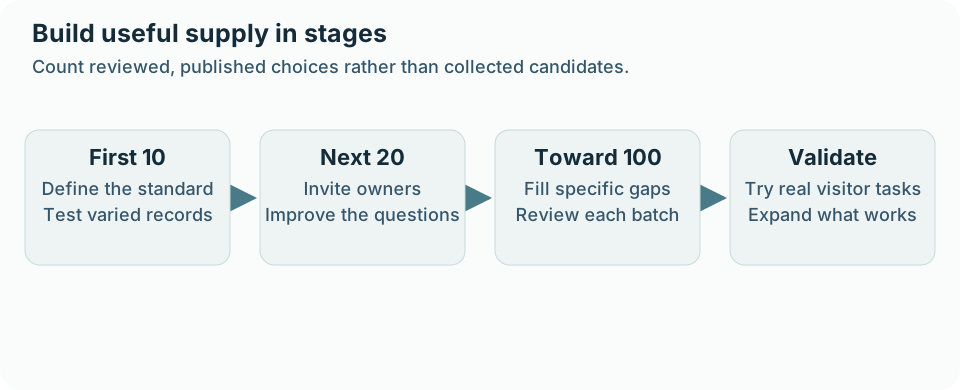
For each batch, separate four counts: candidates collected, records prepared, listings approved, and useful listings published. Only the last count supports the public directory. If an import creates 40 drafts, those are 40 records awaiting review rather than 40 finished profiles.
Review duplicates before adding more supply. Business Data import protection relies on saved source identifiers; it should not be treated as a guarantee that every manually created business will be recognized. For a business already entered manually, consider a reviewed enrichment match instead of importing a second record simply to obtain missing details.
After publication, check category placement, geography, contact information, and important filters. Keep business names consistent without flattening legitimate differences between branches. When several sources describe the same entity, resolve the identity before creating another listing.
Make participation worthwhile without promising traffic
Early businesses need a clear reason to spend time on the profile. That reason may be inclusion in a tightly focused community resource, an accurate public page, useful service details, or a practical way for visitors to contact them. Explain the value you can currently provide.
A free initial profile may reduce friction, but decide what happens later. If premium visibility or paid packages are part of the model, make the boundaries clear. Do not imply that a free profile guarantees a ranking position, leads, or permanent placement under terms you have not defined.
Keep editorial inclusion separate from paid prominence. Visitors should understand whether a label identifies a real service characteristic, a reviewed status, or a promotion. Building the first collection is easier when your promises remain simple enough to keep.
As the directory develops, the directory monetization guide can help connect paid options to a useful visitor and owner experience. Revenue design should build on actual value rather than conceal an incomplete launch.
Validate the visitor journey before a larger promotion
Invite a small group of residents or target customers to complete realistic tasks. Ask them to find a provider for a specific service and area, compare a few records, and reach the appropriate next step. Observe where they hesitate.
If a search returns no useful options, identify the cause. You may lack supply in that area, store the relevant detail inconsistently, or offer a filter that is too restrictive for the current inventory. Adding more random listings will not solve every one of those problems.
Maintain clear structured information as you grow. Current service descriptions, locations, and contact routes help both people and compatible AI experiences use the directory’s real records. Generating longer descriptions does not establish that a business offers an unconfirmed service.
Once the small launch works, expand promotion and continue filling the specific coverage gaps you observe. The directory traffic-growth guide is the next stage: attracting demand to pages that already help visitors make a decision.
Track the quality of acquisition, not just the total
A compact weekly review can include published eligible listings, important coverage gaps, submitted records awaiting review, owner confirmations received, and corrections reported by visitors. These measures show whether the collection is becoming more useful.
Also record how long a new record takes to prepare and approve. If every listing needs extensive cleanup, improving the source template or submission questions may be the best growth investment. If owners consistently stop before submitting, inspect the form and the value proposition.
Treat the first 100 as a learning cycle. By the time you reach it, you should know which sources are dependable, which owners participate, which fields matter, and which visitor tasks the directory serves well.
FAQ
Do I need 100 listings before launching?
No. Launch when the initial collection supports a clear set of useful visitor tasks and your team can maintain it. The number is a planning milestone, not a universal threshold.
Should I import listings or ask owners to submit them?
Use the route that fits the source and review capacity. Imports can reduce entry work; owner participation can improve detail and ongoing maintenance. Both need a publication standard.
Does Business Data publish imported businesses immediately?
Selected businesses become draft listings for review. Check their details and category assignments before deciding to publish. Changes made to existing published records through maintenance can affect public information.
Can I claim that businesses approved their profiles after importing them?
Only when that approval actually occurred. Keep imported, editorially reviewed, and owner-confirmed information distinguishable in your operating process.
What if many categories are still empty?
Reduce the launch scope or recruit specifically for those gaps. Avoid promoting a broad selection the current directory cannot support.
What should happen after the first 100 listings?
Review visitor tasks, owner participation, correction workload, and coverage. Expand where the existing experience is useful and there is a sustainable way to maintain the additional information.