
A directory loses value when a visitor acts on a detail that is no longer true. A telephone number can still look plausible after a business changes it. A provider can appear under the correct category while serving a different area. A listing can be complete, neatly formatted, and outdated at the same time. Directory listing data quality is the work of keeping those records useful enough for the decisions people make.
With Listdom, that work can combine owner submissions, editorial review, structured fields, and reviewed Business Data enrichment or refresh. The starting point is a clear operating process: decide which facts matter, know where they came from, assign responsibility, and give corrections a dependable route into the published record. This guide builds that process around a local service directory.
Define quality around the visitor’s decision
Start with a task rather than a target percentage. Someone choosing an electrician needs to know whether the provider serves their neighborhood, offers the relevant work, and can be contacted. A correct business name alone does not make that record fit for the task. Someone planning a museum visit may care more about opening hours, entrance arrangements, and the current official website.
List the facts that could change the outcome. Mark each as essential, useful, or optional for your particular directory. This prevents a common maintenance mistake: polishing descriptions while important contact details go unchecked. It also gives editors a consistent publication standard instead of a vague instruction to make listings “complete.”
| Quality question | Service-directory example | A practical check |
|---|---|---|
| Is the fact accurate? | The published phone reaches this provider | Confirm against an appropriate current source |
| Is enough information present? | Visitors can identify the service and area | Check essential fields before publishing |
| Is the record current enough? | Emergency callouts are still offered | Review changing claims more often |
| Is the structure consistent? | All service areas use agreed place names | Normalize terms during review |
| Is the entity clear? | Two branches are distinct records | Compare location and business identity |
These dimensions describe your editorial standard. They are not a built-in Listdom quality score. Decide what passing each check means for the audience you serve, then measure the checks you can actually perform.
For the larger relationship between dependable information and agent-assisted discovery, see how to prepare a directory for AI agents. The operational work below is what keeps that foundation useful after launch.
Keep the fact, source, and review decision separate
For each important detail, distinguish the published value from the evidence behind it. “Serves the north district” is a fact you may publish; a business owner’s confirmation is its source; an editor’s decision to accept it is the review outcome. Mixing these together makes later disagreements harder to resolve.
Maintain a private review record with the listing identifier, source, date checked, reviewer, and unresolved questions. You can keep this in an editorial log or an appropriate internal system. Do not assume a public custom field is a safe place for private contact details or internal notes, and do not describe an external log as a native Listdom audit feature.
A reasonable source order depends on the field. A business’s current website may support its public services, while direct confirmation may be necessary for a temporary closure. A directory owner should avoid turning an old third-party description into a newly verified claim merely by rewriting it.
When two sources disagree, identify the exact disputed fact. Check the address for the correct branch, compare dates, and contact the responsible party when appropriate. Leave an uncertain optional value out or clearly describe its limits rather than selecting whichever answer creates the most attractive listing.
Review changing facts before stable background information
Every record does not need the same review frequency. Opening hours, service availability, contact routes, and booking information can change faster than the building’s architectural history. A seasonal attraction needs a different schedule from a professional association whose contact details rarely change.
Set an initial cadence as an operating choice, then adjust it using actual corrections. For example, your team might check volatile service details monthly and relatively stable descriptions quarterly. Those intervals are examples, not a Listdom scheduling promise or a universal standard. A serious correction report should trigger review immediately, regardless of the calendar.
Use three queues: urgent corrections affecting a current visitor decision, routine checks that are due, and low-risk improvements such as missing descriptive context. A small directory can maintain these queues in a simple log. The important part is that someone is responsible for clearing them.
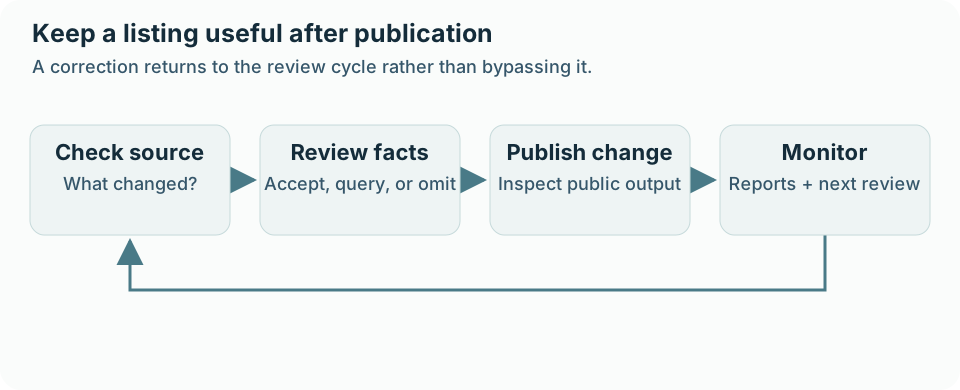
Track what was checked, not only whether the listing was opened. A “last reviewed” statement should have a defined scope. If an editor only confirmed the website address, do not imply that prices, qualifications, and every service claim were independently verified that day.
Give owners a correction route and editors a publication rule
Letting businesses help maintain their records can reduce editorial workload, provided the workflow is clear. Explain who may request an update, what evidence is useful, and how visitors can report an obvious error. Review ownership and access before inviting someone to manage an existing listing.
Listdom’s frontend dashboard supports listing management for the appropriate users. Configure submission behavior under Listdom → Settings → Frontend Dashboard → Add Listing → General. Review Listing Status and the applicable guest, role, and package behavior. Do not assume one dropdown overrides every active workflow.
If you want new submissions held for editorial review, test the actual submitter role and any relevant membership package. Package auto-confirm settings can affect publication outcomes. Changes to existing records also deserve their own test; a successful test of a new listing does not prove that every edit follows the same path.
The Listdom moderation guide explains these interacting layers. Use it to configure the behavior, then document your editorial acceptance rules separately: acceptable evidence, required fields, handling of disputed claims, and who may approve publication.
Use Business Data to review missing or changed information
When an existing business listing lacks useful details, Listdom’s Business Data maintenance can provide a structured review workflow. Go to Listdom → Import / Export → Business Data. Use Enrich Listings to find and confirm a business match for an existing record; use Refresh Listings for records already linked to a business source.
The practical sequence is:
- Select the relevant listings and check that names and addresses identify the correct entities.
- Choose Estimate credits and review the cost for that selection.
- Use Fetch Business Data and review when you accept the estimate.
- Compare the business match and the current versus proposed field values.
- Select only the changes you want, then choose Apply selected changes.
- Inspect the saved results and review skipped records individually.
Fetching source data and saving a change are separate decisions. The lookup can consume Webilia Credits even before an editor applies replacements. A matching business name is also insufficient evidence by itself; compare the address and branch identity.
Refresh is an administrator-initiated review process, not a promise of continuous synchronization. A reported closure does not automatically delete or unpublish the listing. Check what the directory should communicate and make the appropriate editorial decision. The Business Data maintenance documentation explains eligibility, estimates, matching, and batch-review behavior.
Resolve duplicates by identity, not by title alone
A duplicate review begins by asking what one listing represents. Two records with the same brand name may describe separate branches. Two different names may refer to one business after a rebrand. A practitioner and the clinic where they work may both deserve listings if your directory deliberately represents both entities.
Compare addresses, official websites, contact information, source identifiers, and ownership context. Check whether visitors use the records for the same decision. Preserve real distinctions that affect where someone goes or whom they contact.
Listdom’s Business Data import duplicate protection uses its saved source identity. Do not assume it recognizes every manually entered record because the title is similar. For an existing manual record, review an enrichment match before importing another business simply to obtain its missing contact information.
If a duplicate must be consolidated, plan the content and URL consequences before removing anything. Preserve useful information and consider incoming links. Redirect decisions belong to your site’s URL management process; they should not be treated as an automatic result of deleting a listing.
Protect quality when importing in bulk
Imports multiply both good decisions and bad ones. Before a large import or update, identify the source owner, the date represented by the export, the record identifiers, and which existing values the operation could affect. Keep a backup and use a representative sample.
Include difficult records in that sample: missing optional values, multiple locations, changed contact information, and identifiers that resemble internal listing IDs. Inspect the results in the editor, on public pages, and through the filters visitors use. A value in the wrong field can look acceptable in a description while failing every related search.
The bulk listing import guide covers preparation and mapping. For ongoing quality, add a short handover after each import: records accepted, records needing review, source date, known exclusions, and the person responsible for resolving exceptions.
This handover is particularly useful when an agency imports a client’s initial inventory and another team maintains it afterward. The next editor should be able to explain where the records came from without reconstructing the import from filenames.
Keep public pages and machine-readable information consistent
Accurate source records matter wherever people encounter the directory. A visitor may open a listing page, follow a category archive, or encounter details through a compatible machine-readable feed. Publishing a second channel does not repair weak evidence.
Review Listdom → Settings → SEO & GEO → Structured Data and AI Visibility after deciding which information is intended to be public. Check representative outputs as a logged-out visitor, including a listing with optional information and one with restricted details. Hiding a visual element is not a reliable privacy boundary for its underlying data.
Keep internal review notes separate from public facts. If contact details or exact coordinates should not be distributed through an additional public feed, review that feed’s field choices deliberately. The AI visibility and structured-data guide explains these publication decisions.
Dependable directory information can help assistants ground answers in specific, current records. That benefit depends on what the directory maintains and makes available; it does not guarantee a citation, recommendation, or outside service’s use of a listing.
Measure the maintenance process with a small useful dashboard
Choose a few measures that reveal what needs attention: the share of listings passing essential-field checks, overdue reviews, correction requests awaiting a decision, confirmed duplicates, and recurring import errors. Record a baseline before setting improvement targets.
Separate the number of checks from the number of corrected facts. A high activity count can hide a backlog if editors repeatedly open easy records while difficult disputes remain unresolved. Review the oldest urgent item and the most common failure reason alongside the totals.
Once a month, ask whether a source, field, or submission question is causing repeated errors. Fixing an unclear service-area question can be more effective than correcting the same misunderstanding across dozens of records. Quality improves when the collection process becomes clearer, not only when editors work faster.
FAQ
Is a complete listing necessarily accurate?
No. Every field can contain a value while some values are outdated or wrong. Check the facts that affect the visitor’s decision as well as whether the fields are populated.
How often should I review listings?
Use the rate of change and the consequences of an error. Review volatile or consequential details more often, and treat credible correction reports as triggers outside the routine schedule.
Does Listdom Business Data overwrite listings automatically?
Its maintenance workflow presents matches and field differences for review before selected changes are applied. Refresh is initiated by an administrator. Review credit estimates before fetching and inspect every selected replacement.
Can an owner update a listing without entering WordPress administration?
Listdom’s frontend dashboard supports management for appropriate users. The available actions and publication behavior depend on the site’s configuration, roles, ownership, and active add-ons.
Does a verified badge prove every listing detail is current?
Treat any badge according to its defined verification process. Ownership verification and independent confirmation of every service, price, or opening hour are different checks. Explain what your directory actually reviewed.
Where should I begin if the directory is already large?
Audit a representative sample and identify the highest-impact failures. Correct urgent contact, location, and availability errors first, then improve the sources and workflows that keep producing them.