
A useful city directory helps someone make a local decision: where to spend an afternoon, which nearby service to contact, or what a neighborhood offers. A long list of businesses is only part of that experience. Visitors also need understandable geography, relevant categories, dependable details, and a clear route from discovery to a real place or provider.
You can build a city directory website with WordPress and Listdom by treating local curation as the organizing principle. Start with a defined audience and area, model neighborhoods separately from street addresses, create useful place records, and connect those records through search, maps, and editorial guides. This article explains those city-specific decisions rather than repeating a general WordPress installation tutorial.
Choose the local audience before the homepage design
Residents, visitors, students, and relocating families can use the same city in different ways. A weekend visitor might need attractions, cafés, and transport context. A resident looking for a repair service may care more about service area, specialties, and contact details than a photogenic street scene.
Choose one audience for the first release and write down its three most important tasks. For example: find a family-friendly place to eat in the center, compare indoor activities on a rainy afternoon, and locate a useful neighborhood service. Each task should lead to records and information you can maintain.
Avoid combining every possible city resource at launch. A tourism guide, a local services marketplace, and a municipal information portal have different editorial responsibilities. You can expand later, but the first navigation should communicate what the site currently does well.
For the broader business model and initial local-directory decisions, use the local business directory guide. A city guide adds a specific layer: helping people understand how places, neighborhoods, and local recommendations relate.
Give geography a clear role
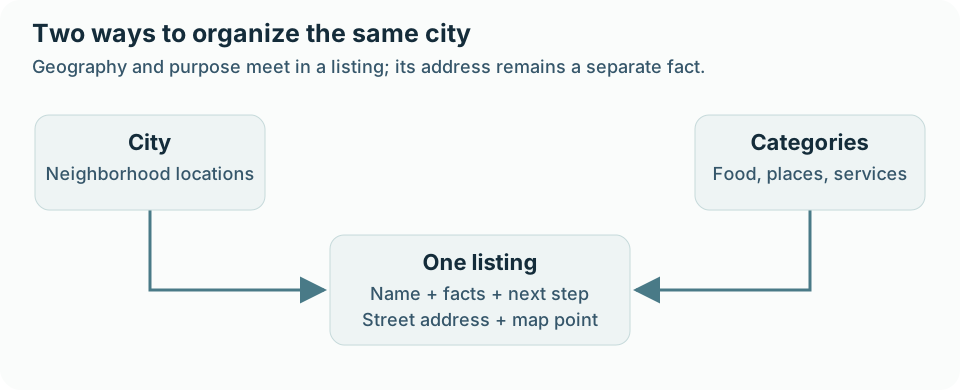
A city name, neighborhood, street address, map coordinate, and service area can all describe location, but they are not interchangeable. A café has a physical address. An electrician may work across several neighborhoods. A guide to the waterfront can group places whose street addresses vary.
In Listdom, manage geographic grouping under Listings → Locations. Locations can have parents, so a city can contain neighborhood terms. Use a hierarchy that matches the actual launch area. A directory for one city may not need empty country and state levels merely because a global directory would use them.
Create an editorial naming policy before importing a large dataset. Choose how to handle alternative spellings, district abbreviations, and informal neighborhood names. Preserve useful local language in descriptions, but avoid creating separate taxonomy terms for every spelling variation.
Street addresses and coordinates belong to the place record. Confirm map pins independently of the neighborhood assignment: a record can be assigned to the correct neighborhood while its marker points to another branch. The locations-versus-addresses guide explains this distinction in more detail.
Organize categories around what people want to do
Categories should make the city easier to understand. “Eat and Drink,” “Things to Do,” and “Local Services” may be useful starting groups, provided their contents match your audience. A resident-focused directory might instead begin with home services, health and wellbeing, and everyday shopping.
Manage the category structure under Listings → Categories. Start with a small vocabulary you can apply consistently. Create a subcategory when it helps people distinguish choices and you have enough relevant records to support it. Do not add dozens of empty branches to make the site appear comprehensive.
Keep a category’s role separate from amenities and descriptive facts. A restaurant’s cuisine may influence your category structure; wheelchair access, outdoor seating, or parking may be better represented through appropriate features or fields. The choice should reflect how visitors search and compare.
Listdom has a primary-category model, and assigning additional categories can depend on the active add-on setup. Design the first version around verified behavior rather than assuming every place can appear everywhere. The Listdom listing data-model guide helps explain categories, locations, and related listing information.
Design listing records that answer local questions
A city listing should help someone decide whether to go, contact, or investigate further. A title and a generic paragraph rarely answer enough. Choose the details that matter for the specific type of place, then make those details easy to maintain.
| Type of listing | Useful decision details | What needs particular care |
|---|---|---|
| Café or restaurant | Address, opening hours, cuisine, contact or official website | Holiday hours, accessibility claims, price context |
| Museum or attraction | Location, visit information, official link, practical facilities | Seasonal closures and changing admission arrangements |
| Neighborhood service | Services, area served, contact route | Confusing the office address with the service boundary |
| Community venue | Location, available facilities, inquiry route | Presenting unconfirmed facilities as guaranteed |
| Shop | Specialty, address, hours, website | Branch identity and outdated trading information |
Create a representative record through Listings → Add New Listing before committing to the field set. Include the public facts, assign category and neighborhood, and check the map position. Review how the record appears on its single listing page and in a results card.
Use descriptions to explain local context rather than repeat the same promotional paragraph across many records. What makes the place relevant to this guide? What can a visitor reasonably expect to find there? Keep uncertain details qualified and link to an official source when a rapidly changing policy needs confirmation.
Images can help visitors recognize a place, but only publish images you can use appropriately. Write alt text that describes the actual image and its purpose. Do not use a generic city photograph to imply that you visited or verified a specific business.
Build the first WordPress version in a practical sequence
Set up the smallest complete visitor journey before adding more content or design complexity:
- Establish the initial categories and neighborhood locations.
- Create a varied sample of real listings and check their public information.
- Build a listing view under Listdom → Shortcodes.
- Place the saved view on a WordPress directory page using its generated shortcode.
- Create a focused form under Listdom → Search and Filter Builder.
- Connect the form to the intended results view and test filtering.
- Add a clear contribution or correction route when the editorial process is ready.
Listdom provides the directory data and behavior; your WordPress theme and optional builder shape the surrounding layout. Listdomer is an ecosystem theme option, and builder integrations are separate choices. You do not need to treat one theme or page builder as a prerequisite for a city directory.
If you need the full project sequence, follow how to build a directory website with WordPress. Use this city guide to decide what that implementation should contain.
Offer several useful ways into the same places
A visitor may start with a neighborhood, a type of place, or a particular name. Support those starting points without creating several disconnected copies of the inventory.
A neighborhood archive can group local listings. A category page can show one kind of place across the city. A search form can combine a few relevant criteria. A curated article can help a reader choose among those records using editorial context.
Listdom’s archive layout settings and saved shortcodes control how taxonomy results are displayed. Review Listdom → Settings → General → Archive Pages for the relevant taxonomy. Where a per-term archive override is available in your product setup, verify it before assuming every neighborhood automatically gets a unique design. Theme templates can still affect the page wrapper.
Treat a neighborhood guide as an editorial page with its own purpose. Explain the area, who it suits, how the selected places relate, and when information was reviewed. A taxonomy term’s description alone should not be assumed to create that complete guide. Test what the theme and chosen template actually display.
Use maps when distance changes the decision
A map helps a visitor see whether several places fit into one outing or whether a provider is nearby. It is less useful when the main question is professional specialization and the business serves the entire city.
Configure the chosen map provider and review addresses and coordinates on real sample records. Then test a layout that balances the map with readable listing details. A map full of markers without clear names, summaries, and links can make comparison harder.
Location filters and radius search answer different questions. Neighborhood selection uses your geographic terms; a distance search depends on a reference point and reliable coordinates. Advanced search behavior can depend on Pro or other add-ons. Introduce those options when the visitor task justifies them.
The local-search guide explains the available discovery concepts. Keep the first search form short enough for someone standing on a street with a phone to use comfortably. Show the important selections, make reset obvious, and avoid forcing geolocation before a visitor understands why it is useful.
Seed the city guide with reviewed local coverage
Start with one coherent part of the city and a few useful categories. Collect records from sources you can review and maintain. An association’s permissioned spreadsheet, direct owner contributions, and carefully selected business-data results can all play a role.
Listdom’s Business Data workflow can import selected businesses as drafts for review. CSV imports can bring in an existing structured file. These routes reduce entry work, but neither establishes that every detail is current or appropriate for publication.
Review category and neighborhood assignments in small batches. If you apply the same location term to every result in a batch, make sure it belongs on every record. Providers serving multiple areas and businesses near a neighborhood boundary deserve individual attention.
Invite relevant owners to confirm their public details and explain the correction process. Do not imply that imported profiles are owner-approved or that paid placement is an editorial recommendation. A smaller guide that explains its selection approach can be more useful than a larger collection whose inclusion rules are unclear.
Run the city guide as a maintained local resource
Cities change. Places close temporarily, businesses move, and services adopt new opening hours. Assign an editor to each important section or review queue so that a report does not disappear between teams.
Prioritize changes that affect a visit: the wrong address, a closed venue, an unusable contact route, or misleading availability. Keep an internal record of the source and what was checked. A general date on a page should not imply that every fact received the same review.
Current, structured information also gives compatible assistants something concrete to retrieve and compare. The directory’s contribution is the maintained local record and useful context, not a generic paragraph an assistant could produce without visiting the site. When using SEO & GEO discovery options, review which public information is exposed and keep it consistent with the listing.
Create useful guides only where you can add local knowledge. Explain the selection criteria for a family outing or neighborhood comparison instead of generating near-identical articles for every area. Link to the relevant listing records so readers can check details and take the next step.
Choose revenue that fits the guide’s role
A city directory can support paid profiles, disclosed featured visibility, relevant advertising, or booking-related workflows when the appropriate products are configured. Choose the model that reinforces the audience’s reason to use the guide.
For example, a useful free profile can coexist with an optional paid visibility package. Keep factual categories and neighborhood assignments independent of payment. If a business is promoted, make that prominence understandable rather than presenting it as an undisclosed “best” recommendation.
Start with one revenue offer you can explain and deliver. Proving that people find and use the guide is more valuable than installing several monetization add-ons before the inventory works. The directory monetization overview covers the options and their prerequisites.
FAQ
Is a city directory the same as a local business directory?
They overlap. A city guide typically adds neighborhood context, attractions, local resources, and editorial ways to explore the place. Decide which of those your audience needs before expanding the scope.
Should neighborhoods be categories or locations?
Use locations for geographic grouping and categories for the kind of listing. This lets a café belong to a neighborhood without making neighborhood names compete with business types.
Does every listing need a map marker?
Use precise map information where physical location helps the visitor. For services covering a wider area or sensitive locations, decide how location should be represented before publishing an exact point.
Can I use any WordPress theme with Listdom?
Listdom supplies the directory layer and works with compatible WordPress themes. Listdomer and supported builder integrations are options to evaluate for the desired design workflow.
Should the guide cover the whole city immediately?
Only if you can provide useful and maintainable coverage. A focused release for a few neighborhoods and tasks gives you a better basis for testing and expansion.
What makes the guide useful when people also use AI assistants?
Current local records, meaningful comparisons, clear sources, and real next steps give the guide practical value. Machine-readable publication can help compatible systems interpret that information, without guaranteeing use or recommendations.