


The Listdom TopUp Addon gives listing owners a way to purchase a temporary visibility boost for a specific listing. It updates that listing's Top-Up Date, so a directory page that sorts by the most recent top-up can place it higher in the results. That makes TopUp a focused promotion tool: it is for a business that wants extra attention now, not a permanent replacement for useful listing data, honest ordering, or a sound directory model.

The Listdom TopUp Addon gives listing owners a way to purchase a temporary visibility boost for a specific listing. It updates that listing’s Top-Up Date, so a directory page that sorts by the most recent top-up can place it higher in the results. That makes TopUp a focused promotion tool: it is for a business that wants extra attention now, not a permanent replacement for useful listing data, honest ordering, or a sound directory model.
What the Listdom TopUp Addon does
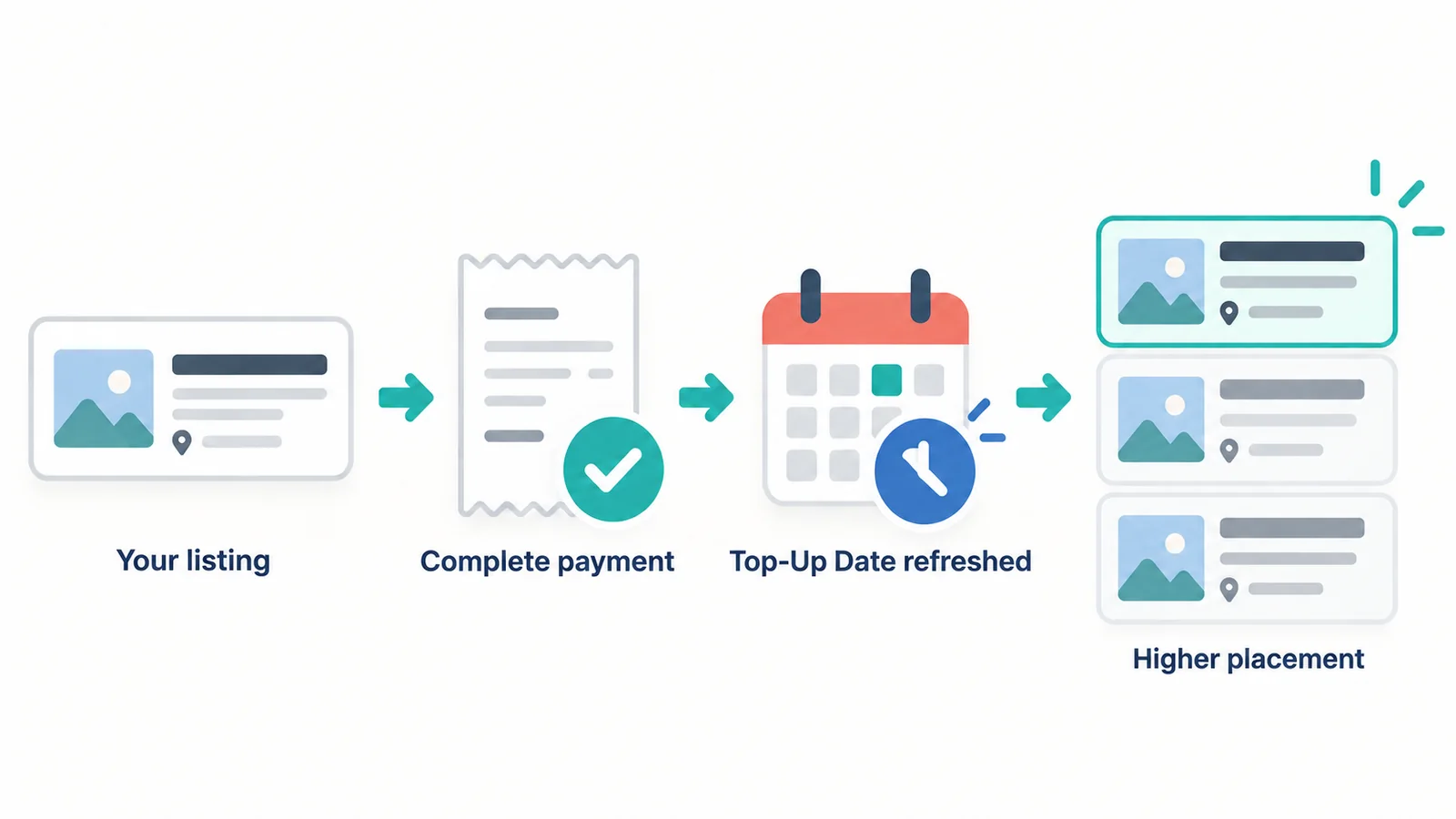
TopUp adds a paid “bump” workflow to a Listdom directory. A listing owner selects one of their listings from the frontend dashboard, starts a Top Up purchase, and completes the checkout method the directory owner has configured. After a successful top-up, the listing receives a new Top-Up Date.
The visibility effect depends on the directory view. When the relevant Listdom shortcode or page is sorted by Top Up Date, the most recently promoted listings appear first. A top-up does not create a duplicate listing or require the owner to enter the listing details again; it refreshes the listing’s promotion timestamp.
That simple model is valuable for directories where position affects discovery: a local business directory during a seasonal campaign, a classifieds site with fast-moving inventory, or a service directory where providers want extra exposure during high-demand periods.
TopUp is different from Rank, labels, memberships, and ads
Directory monetization is clearer when each option has one job.
| Option | What it changes | When it fits |
|---|---|---|
| TopUp | The recency of a paid promotion, when a view is sorted by Top-Up Date | A listing owner needs a limited visibility boost |
| Rank | A configurable score used for ordering and filtering | The directory needs a consistent quality or relevance model |
| Labels | A visual status such as Featured, Verified, or Sponsored | Visitors need to notice or understand a listing status quickly |
| Memberships | Package limits, access, or bundled benefits | Owners need an ongoing participation plan |
| Ads | Dedicated advertising placements on directory pages | The directory sells sponsor or third-party ad inventory |
TopUp and Rank are especially easy to confuse. Rank is the directory’s scoring layer; TopUp is a separate promotional action. For the wider design decision, read how directory ranking and featured visibility work in Listdom.
When a listing promotion is worth offering
TopUp works best when a higher result position has understandable value. A business owner should be able to look at the directory and see why a temporary boost could help: there are competing listings, people browse or search often, and the listing has a timely offer or launch to promote.
It is usually a good fit for:
- Local business directories where several providers compete in a category.
- Classified directories where a fresh listing can become less visible quickly.
- Property, event, or service directories with campaign or seasonal demand.
- Directories that want an optional upgrade without forcing every owner into a subscription.
It is less useful for a small, carefully curated directory where every listing is already easy to find, or for a directory with weak categories, sparse listing data, or little visitor traffic. In those situations, a paid bump can look like a workaround for a discovery problem that should be fixed first.
How listing owners purchase a TopUp
Once TopUp is configured, the owner journey is intentionally short:
- The owner signs in and opens the frontend dashboard.
- In the listing management area, they choose the Top Up action for the listing they want to promote.
- Listdom starts the configured checkout flow for that listing.
- After successful payment and order completion, the listing receives the current Top-Up Date.
- Any directory view sorted by Top-Up Date can now show that listing ahead of older promoted listings.
The add-on supports WooCommerce as its standard purchase path, and it can also use Listdom Payments when that payment engine and its checkout setup are configured. The exact checkout screen therefore follows the payment approach you choose, while the listing-owner action stays connected to the specific listing being promoted.
Set up an offer that owners can understand
Before announcing a promotion, decide what the buyer receives. “More visibility” is too vague on its own. Explain where the promoted listing can appear, how the affected pages sort results, and how long the promotion remains active.
For a WooCommerce-based setup, create the product that represents the purchase, then go to Listdom → Settings → Addons → Top Up. There you can select the WooCommerce product, review the Top Up New Listings behavior, and choose whether successful WooCommerce orders complete automatically. With Listdom Payments, configure the payment gateways and checkout pages first, then select the plans that apply to TopUp.
Use a simple offer at first. For example, a city directory could sell a seven-day “Recently Boosted” placement for restaurants running a seasonal menu. Test it with a small group of real listing owners before adding multiple tiers, bundles, or automatic renewals.
Build with Listdom
Build your directory website with Listdom
Launch a polished WordPress directory with listings, locations, maps, search, and room to grow into a full directory business.
Make the ordering visible and fair
TopUp only changes discovery when the directory view uses the Top-Up Date. Open Listdom → Shortcodes, edit the shortcode behind the directory page, and review its sorting options. Set Top Up Date as the default only when it matches the promise you make to visitors; otherwise, offer it as a visible sort choice such as “Recently Boosted.”
Transparency matters. A visitor should not be left guessing why some listings appear first. If a promotion is commercial, consider pairing the placement with a clear visual label, such as Sponsored or Featured. The guide to featured listing labels and badges covers that visual-status layer in more detail.
Avoid selling more promoted placement than the page can reasonably support. If every result is boosted, the boost loses its meaning. Keep organic discovery useful, keep your labels honest, and make the promotion’s duration clear before checkout.
Should new listings receive an automatic Top-Up Date?
The Top Up New Listings setting gives new listings an initial Top-Up Date when they are created. This can be a fair default for a directory that sorts by Top-Up Date: a new listing gets a first opportunity to be discovered before it gradually moves down the page.
Turn this behavior on when freshness is valuable to visitors, such as a classifieds or event directory. Consider turning it off when the directory relies on editorial review, a deliberate ranking model, or a tightly managed release schedule. The goal is not to make every new entry look paid; it is to make the ordering model match the experience you want to create.
Time-bound promotions and recurring access
Recent Listdom promotion workflows support duration-aware TopUp access. A paid promotion remains active for the duration defined by its associated plan or product and ends when that period ends. Where a directory uses Listdom Payments with recurring promotion access, the access remains available through the already-paid period when a recurring purchase is cancelled or expires.
This does not mean every directory needs a recurring promotion. A one-time boost is often easier for a local directory or a small classifieds site to explain. Recurring access fits only when owners have a clear, ongoing reason to keep buying promotion, and when the directory can continue to provide enough audience value to justify it.
Common TopUp mistakes to avoid
Treating a boost as a permanent ranking system
TopUp refreshes a promotion timestamp. It does not replace a deliberate Rank model, category structure, reviews, or editorial judgment. Keep its purpose narrow.
Hiding the commercial nature of placement
If a paid boost can affect a result page, explain that in your terms and use an appropriate label where visitors need the context. Trust is part of the product.
Offering a promotion before the directory has demand
Promotion becomes valuable when people are actively browsing a useful directory. Build enough quality inventory and a clear discovery experience first.
Adding complicated plans too early
Start with one clear promotion product or plan. Add options only after you know what owners actually buy and what visitors can still understand.
A practical TopUp launch checklist
- Confirm that TopUp is activated alongside Listdom.
- Choose WooCommerce or Listdom Payments and complete its checkout setup.
- Define one clear top-up product or plan and its duration.
- Review Listdom → Settings → Addons → Top Up, including the new-listing and order-completion options.
- Configure a relevant listing shortcode to use or offer Top Up Date sorting.
- Test a purchase with a real listing owner account.
- Check the promoted listing on desktop and mobile, including the language used to identify paid placement.
- Review the offer after a small launch before introducing more pricing tiers.
For the larger business-model decision around upgrades, packages, claims, bookings, and advertising, use the directory monetization guide.
FAQ
What does the Listdom TopUp Addon change?
It updates a listing’s Top-Up Date after a successful promotion purchase. A directory view that sorts by that date can show the most recently topped-up listings first.
Is TopUp the same as a featured label?
No. TopUp is a promotion and ordering workflow. A featured, verified, or sponsored label is a visual status. They can work together, but they communicate different things.
Is TopUp the same as the Listdom Rank Addon?
No. Rank uses a configurable scoring model for ordering and filtering. TopUp gives a listing a refreshed promotion date for temporary placement when the directory view is sorted by Top-Up Date.
Can I sell TopUp with WooCommerce or Listdom Payments?
Yes. TopUp can use a selected WooCommerce product, or Listdom Payments plans when the native payment engine, gateways, and checkout pages are configured.
Do all new listings have to receive a Top-Up Date?
No. The Top Up New Listings behavior is configurable. Use it when you want new listings to start with a freshness boost in a Top-Up-Date-sorted directory, and disable it when another ordering model fits better.
Should every directory sell TopUp promotions?
No. It is most useful when visibility has real value because visitors browse a competitive, active directory. A new or heavily curated directory may benefit more from stronger listing quality and discovery before it sells placement.
Use TopUp as a clear, limited visibility offer
The Listdom TopUp Addon is most effective when it does one understandable job: it lets an owner pay to refresh a listing’s placement for a defined period. Pair that simple workflow with honest ordering, sensible pricing, and enough real directory demand, and it becomes a useful high-value upgrade rather than a confusing shortcut.
FAQ
Common questions
What does the Listdom TopUp Addon change?+
It updates a listing's Top-Up Date after a successful promotion purchase. A directory view that sorts by that date can show the most recently topped-up listings first.
Is TopUp the same as a featured label?+
No. TopUp is a promotion and ordering workflow. A featured, verified, or sponsored label is a visual status. They can work together, but they communicate different things.
Is TopUp the same as the Listdom Rank Addon?+
No. Rank uses a configurable scoring model for ordering and filtering. TopUp gives a listing a refreshed promotion date for temporary placement when the directory view is sorted by Top-Up Date.
Can I sell TopUp with WooCommerce or Listdom Payments?+
Yes. TopUp can use a selected WooCommerce product, or Listdom Payments plans when the native payment engine, gateways, and checkout pages are configured.
Do all new listings have to receive a Top-Up Date?+
No. The Top Up New Listings behavior is configurable. Use it when you want new listings to start with a freshness boost in a Top-Up-Date-sorted directory, and disable it when another ordering model fits better.
Should every directory sell TopUp promotions?+
No. It is most useful when visibility has real value because visitors browse a competitive, active directory. A new or heavily curated directory may benefit more from stronger listing quality and discovery before it sells placement.

