
A visitor may know what they need without knowing which filters your directory uses. Someone looking for a family-friendly place to stay near a train station, for example, may not think to search by category, location, amenities, and distance one at a time. An AI assistant can help translate that request into a search of the directory and bring relevant listings into view.
The useful result is not a clever answer by itself. It is a shorter path from a visitor’s question to current listing information they can inspect, compare, and act on. With Listdom, site owners can offer the Directory Concierge and interactive experiences through compatible AI clients. What visitors can do depends on the directory’s published information, enabled features, connection, and permissions.

A visitor may know what they need without knowing which filters your directory uses. Someone looking for a family-friendly place to stay near a train station, for example, may not think to search by category, location, amenities, and distance one at a time. An AI assistant can help translate that request into a search of the directory and bring relevant listings into view.
The useful result is not a clever answer by itself. It is a shorter path from a visitor’s question to current listing information they can inspect, compare, and act on. With Listdom, site owners can offer the Directory Concierge and interactive experiences through compatible AI clients. What visitors can do depends on the directory’s published information, enabled features, connection, and permissions.
What an AI assistant can add to directory search
A regular search form asks visitors to choose from fields the site owner has configured. That works well when people know which filters to use. An AI assistant gives them another way to begin: they can describe their goal in everyday language, then review the results the directory can support.
For a travel directory, a visitor might ask for a quiet guesthouse near public transportation that allows pets. For a professional directory, someone might look for a Spanish-speaking tax adviser who serves a particular area. The assistant can help turn those needs into a search across the available listing data and filters.
This can make a directory easier to use, especially when a site has many listings or several useful filters. It does not remove the need for a good search form. Visitors should still be able to browse, adjust their criteria, open a listing, or start again without needing to phrase a perfect prompt.
Better matches start with useful listing information
An assistant can only work with information the directory makes available to it. If pet policies, service areas, languages, prices, or opening hours matter to a visitor, those details need to be present and consistently recorded in the listings.
Start by asking what visitors need to decide. A restaurant directory may need cuisine, price range, accessibility, and opening hours. A home-services directory may need service area, specialties, emergency availability, and accepted payment methods. Choose categories and fields that reflect those questions, and encourage listing owners to keep the answers current.
Complete records also help visitors compare results. If one listing has a detailed service area and another leaves it blank, the assistant cannot safely treat the missing answer as a match. It should not guess that an unmentioned feature is available. The directory should make it easy to notice when information is missing or may need confirmation.
For planning categories and listing fields, see how listings, categories, and locations work together in Listdom. To improve geographic discovery in particular, read how local search works in Listdom.
Help visitors compare what listings actually say
Finding a few candidates is only the first part of the decision. Visitors may want to compare location, services, accessibility, availability, price, reviews, or other details that your directory publishes. An assistant can summarize those details or present them in an interactive result, depending on the connected experience.
Keep the comparison grounded in the source listing. A rating is useful context when the directory collects reviews and has made them available to the experience. A booking option matters when the booking feature is active and the listing has bookable items or availability that matches the visitor’s dates and requirements. If a detail is missing, say so rather than filling the gap with an assumption.
The goal is to help people make a more informed choice, not to make the assistant choose for them. Let visitors open the original listing to check details, see policies, and decide whether a result fits. When order or promotion affects which results appear first, make those rules clear in the directory experience.
Give visitors a clear next step
After comparing listings, a visitor may want to read more, ask a question, request an appointment, or book an available option. An AI-assisted directory can help them reach the next step without making them repeat the search from scratch.
Listdom’s agent experiences are designed to let compatible AI clients work with directory tasks such as searching, comparing, contacting, and booking. MCP Apps can provide richer interactive interfaces inside supported AI clients. These connections do not mean every assistant can perform every task: the site must enable the relevant workflow, the client must support the connection, and the visitor must have the required access.
For example, a visitor might find two venues, compare their capacity and location, then open the chosen venue’s listing. If booking is configured, the visitor may continue to check a date or request a reservation. If the directory only provides a contact form, the next step may be an inquiry instead. For setup details, see the Listdom Booking documentation.
Keep a clear confirmation step before an action that sends personal information, contacts a business, or submits a booking request. Show the visitor what will be sent and which listing or date it concerns. The site owner should be able to limit what connected clients can access and review or revoke sensitive permissions.
On-site assistants and external AI clients serve different moments
An assistant built into the directory can guide visitors while they are already browsing the site. It can explain how to search, help narrow a large result set, and direct people to relevant listing pages or configured actions.
External AI clients can help people discover a directory from elsewhere, when the site and client have a compatible connection. Listdom uses standards and interfaces such as MCP, MCP Apps, WordPress Abilities, and WebMCP to make selected capabilities available to supported clients. These names describe how systems connect; the practical benefit is that a visitor may be able to search directory information from the AI tool they already use and continue into the site when needed.
Treat compatibility as something to verify for the specific client and workflow. A client might support search but not interactive results, or it might let visitors view listings without submitting an inquiry. Explain the available actions where visitors encounter them, and keep a direct route to the directory for anyone who prefers to browse normally.
Keep information, permissions, and expectations clear
AI-assisted discovery works best when visitors can tell where a result came from and what happens next. Use these checks when shaping the experience:
- Use current public information. Review listing details regularly, especially hours, prices, service areas, and availability.
- Make missing data visible. An empty field should not be treated as proof that a listing does or does not offer something.
- Keep private details private. Only expose information that the site owner intends compatible clients and visitors to access.
- Ask before consequential actions. Let visitors review contact or booking details before submitting them.
- Keep the listing page available. It remains the place to confirm full details, policies, and context.
- Explain what the assistant can do. Capabilities vary with the site configuration and the AI client being used.
These safeguards help preserve trust while making discovery more convenient. They also make it easier to diagnose a poor result: the cause may be a missing listing field, an outdated record, an unavailable booking slot, or a client that does not support the requested action.
A practical visitor journey to design
Imagine a visitor asks: “Find a wheelchair-accessible café near the museum where I can reserve a table for four this afternoon.” A helpful directory experience can work through the request in stages:
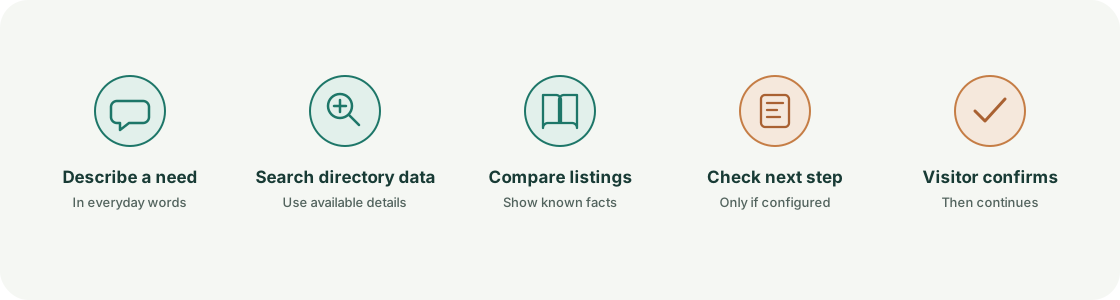
- Clarify the search. Identify the location, accessibility requirement, party size, and time. Ask a follow-up if an essential detail is unclear.
- Search available listing information. Use the fields and filters the directory actually maintains, such as distance, accessibility, and category.
- Show matching options with context. Present relevant details and indicate when a listing does not provide a requested fact.
- Check booking availability if configured. Do not imply a reservation is available until the booking workflow confirms it.
- Let the visitor review and continue. Open the listing or present the configured reservation step, then request confirmation before submission.
If the directory does not store accessibility details or support reservations, the assistant should say what it could verify and offer the available alternative, such as browsing nearby cafés or contacting a listing. A useful assistant makes the directory’s real capabilities easier to use; it does not pretend that missing information or unavailable actions exist.
FAQ
Can visitors search a directory by describing what they need?
Yes, when the directory offers an assistant or compatible AI connection that can search its listing information. The quality of the match depends on the fields, filters, and published details available for that directory.
Can an assistant compare reviews and ratings?
It can use review information when the directory collects reviews, makes them available to the connected experience, and has the relevant review feature enabled. The assistant should present ratings as visitor feedback, not as a guarantee of service quality.
Can an AI assistant submit inquiries or bookings?
That depends on the site’s configured workflows and the connected client’s supported actions. The visitor should be able to review the listing and submitted details and confirm before an inquiry or booking request is sent.
Does every AI assistant support Listdom’s interactive experiences?
No. AI clients differ in the connections and interactive features they support. Site owners should verify each client and workflow they plan to offer, and give visitors a direct way to use the directory site.
What should a directory owner prepare first?
Start with the visitor’s decision. Add the fields needed to answer it, keep listing details current, configure the search and any inquiry or booking workflow, and then test the full experience with realistic requests—including requests where information is missing or no suitable result exists.
Make the directory easier to use wherever visitors start
An AI assistant can help people move from an open-ended need to listings they can evaluate and next steps they can take. The directory still provides the value: current information, relevant choices, and configured ways to connect with a listing owner or book a service.
Listdom’s Directory Concierge and connections for compatible AI clients give site owners ways to bring those capabilities into assistant experiences. Start with the information visitors need, make the available actions clear, and keep people in control as they choose what to do next. For the broader site-owner perspective, read how to make a directory website ready for AI agents.
FAQ
Common questions
Can visitors search a directory by describing what they need?+
Yes, when the directory offers an assistant or compatible AI connection that can search its listing information. The quality of the match depends on the fields, filters, and published details available for that directory.
Can an assistant compare reviews and ratings?+
It can use review information when the directory collects reviews, makes them available to the connected experience, and has the relevant review feature enabled. The assistant should present ratings as visitor feedback, not as a guarantee of service quality.
Can an AI assistant submit inquiries or bookings?+
That depends on the site’s configured workflows and the connected client’s supported actions. The visitor should be able to review the listing and submitted details and confirm before an inquiry or booking request is sent.
Does every AI assistant support Listdom’s interactive experiences?+
No. AI clients differ in the connections and interactive features they support. Site owners should verify each client and workflow they plan to offer, and give visitors a direct way to use the directory site.
What should a directory owner prepare first?+
Start with the visitor’s decision. Add the fields needed to answer it, keep listing details current, configure the search and any inquiry or booking workflow, and then test the full experience with realistic requests—including requests where information is missing or no suitable result exists.