Why this matters more than it seems
Access flow is not just a technical detail.
It affects:
- how quickly a new user can start
- how much friction exists before submission
- whether listing ownership is clear from the start
- whether moderation feels manageable
- whether paid packages or memberships interrupt the journey at the right time or the wrong time
- whether users understand why they are being asked to log in, register, or purchase something
If this part is unclear, even a good listing form can feel confusing.
If this part is clear, the whole directory feels more professional.
The settings that shape this journey
The access flow does not live in only one place.
There are three main layers you need to understand.
1. Frontend Dashboard settings
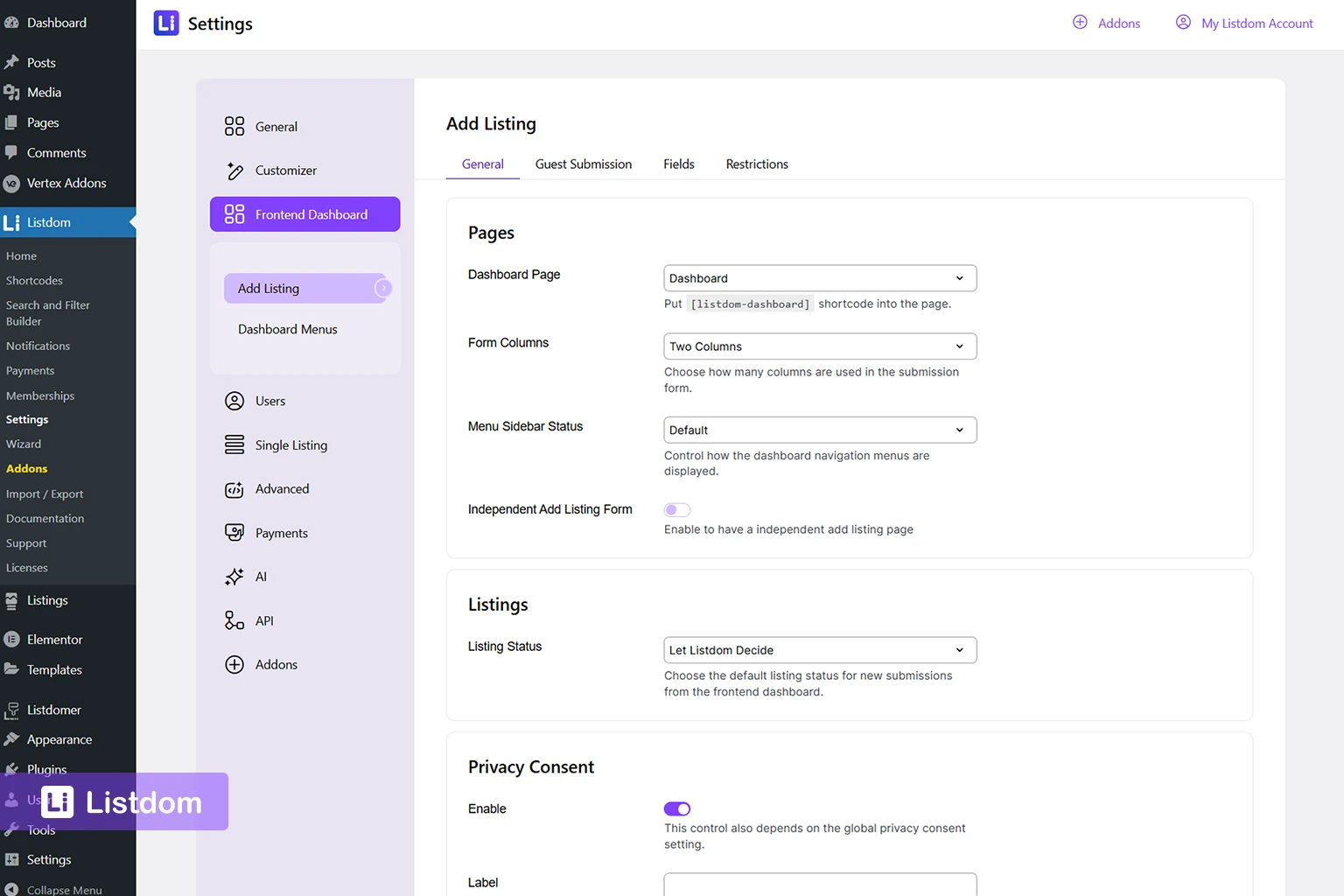
In Listdom → Settings → Frontend Dashboard, you control the submission-side behavior, including:
- The dashboard page general settings
- Guest submission behavior
This is the core layer for deciding whether a user can reach the submission directly or must authenticate first.
2. Users settings
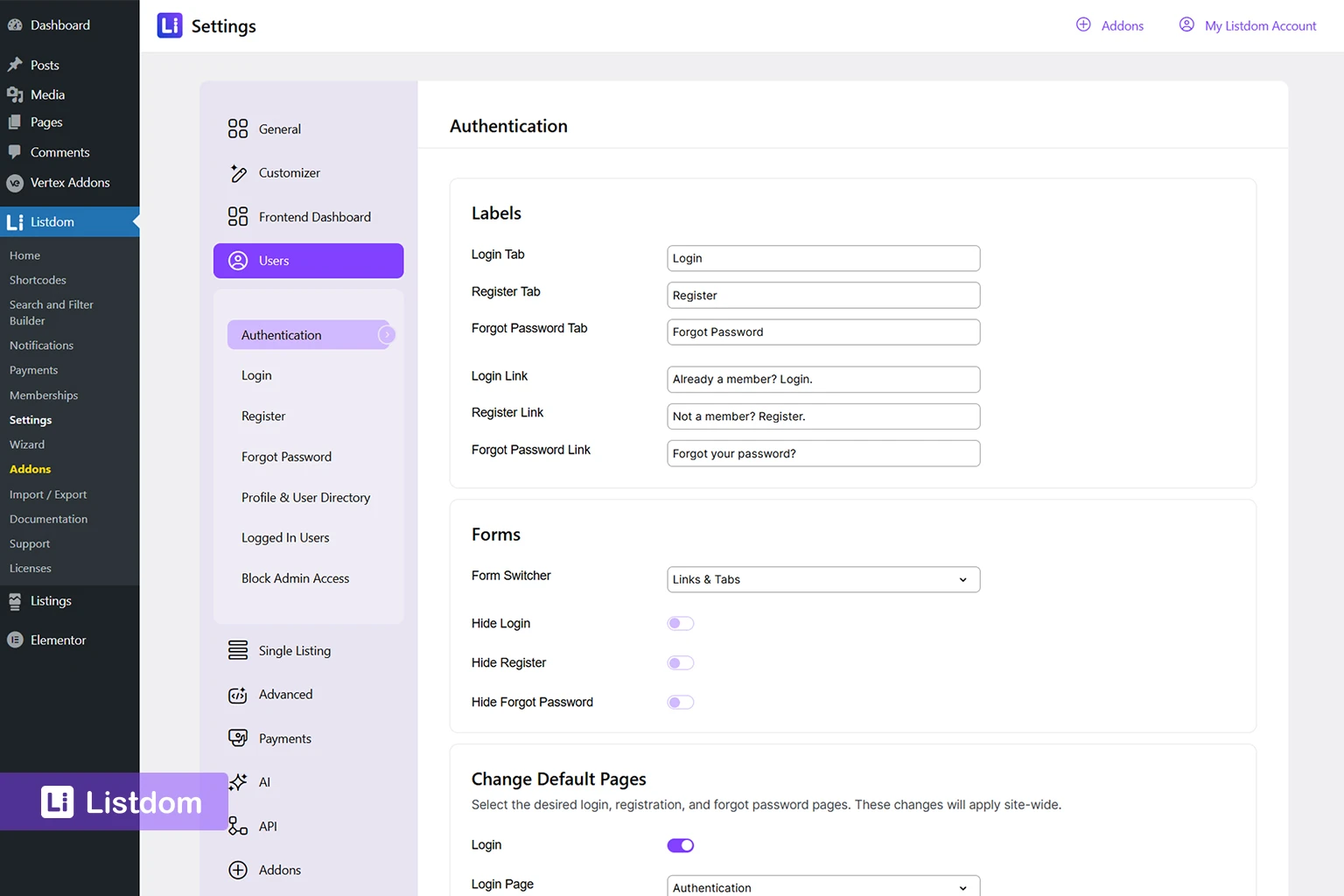
In Listdom → Settings → Users, you control the broader authentication system around Listdom forms and user behavior.
This includes:
- the combined authentication form
- custom login, register, and forgot-password pages
- auto login after registration
- redirect pages by user role
- account URL
- redirect after logout
- blocking selected roles from wp-admin
This layer matters because it shapes what happens after a user logs in, registers, or logs out.
3. Membership and package logic
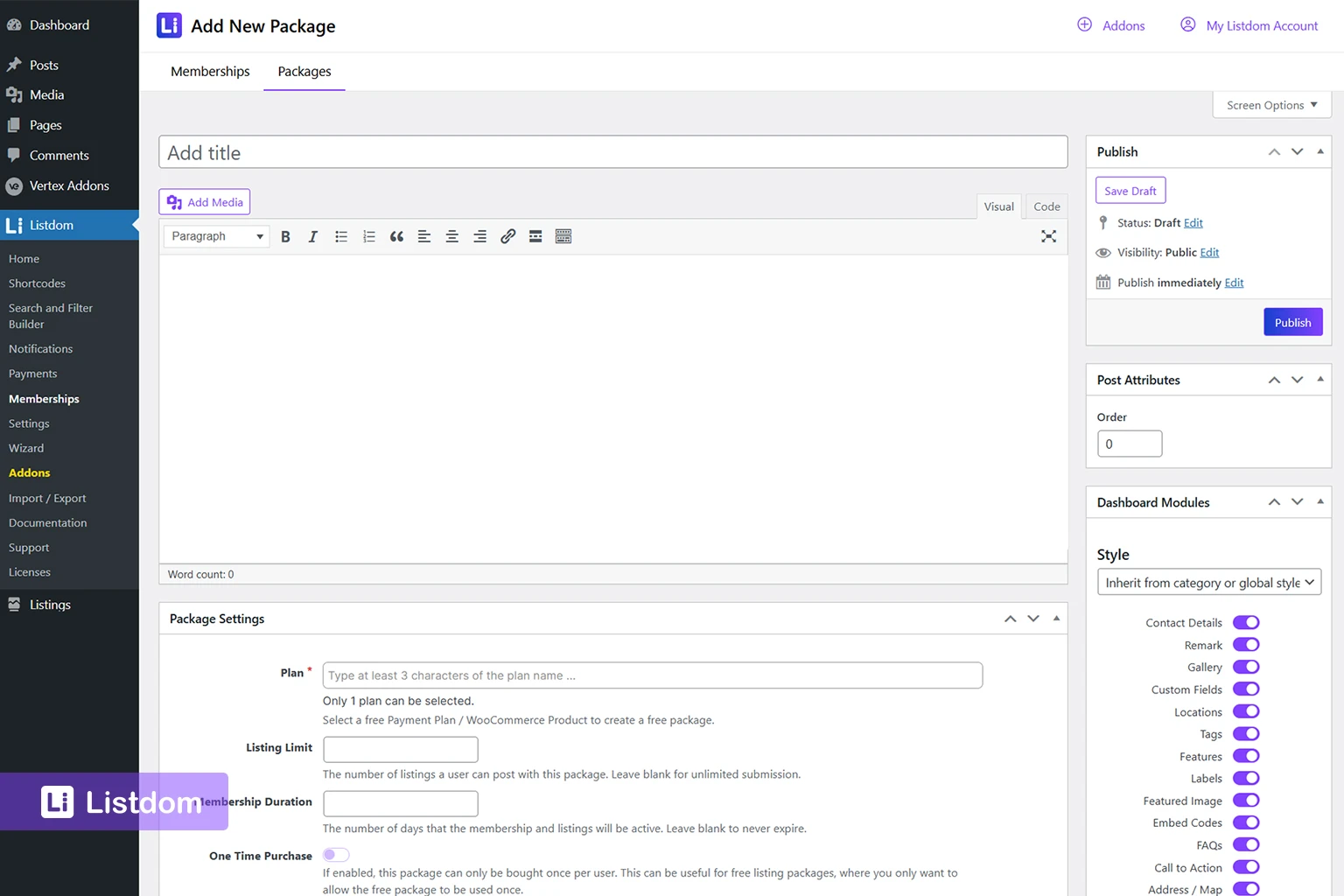
If you use the Membership add-on, access flow can become tied to packages.
In that case, the user journey is no longer only:
login → submit listing
It can become:
login or register → choose package → complete purchase → submit listing
That changes the journey a lot, so it should be planned deliberately.
This is also the point where package rules can start overriding the simpler submission logic. Membership settings, package limits, and package-level auto-confirm behavior can all shape what happens after submission.
The four main access patterns in Listdom
For most onboarding setups, the real journey falls into one of four patterns.
1. Guest submission enabled
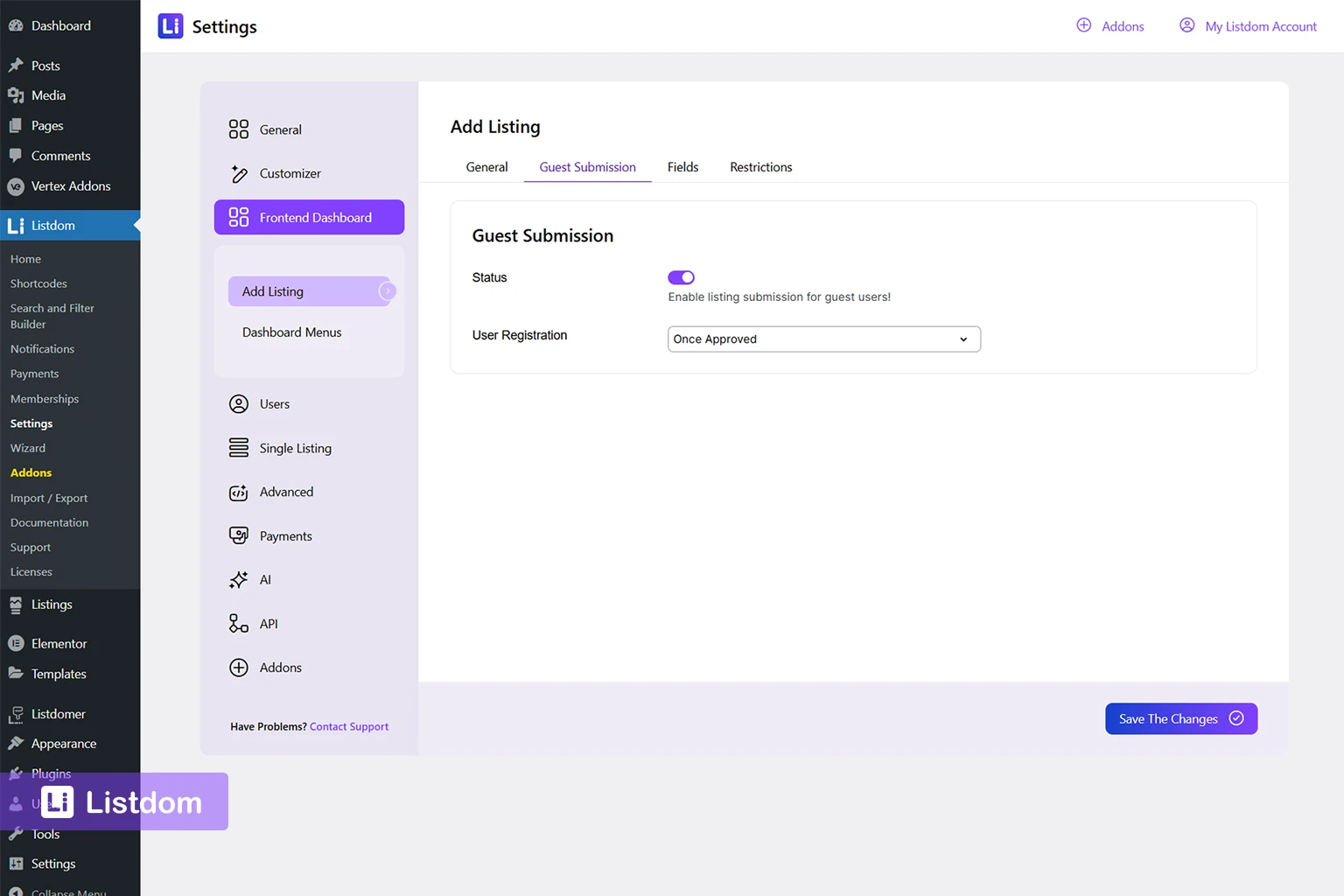
When guest submission is enabled in the Listdom → Settings → Frontend Dashboard → Add Listing → Guest Submission, users can start the listing submission process without logging in first.
This creates the lowest-friction entry point.
It can work well when:
- You want to grow the listing volume quickly
- Your directory is community-driven
- You want to reduce early barriers
- You are comfortable reviewing submissions carefully
But guest submission is not only a yes-or-no setting. It also includes User Registration behavior.
Inside Frontend Dashboard settings, guest registration can be handled in three different ways:
- Once Approved
- Once Submitted
- Disabled
That changes what the user experiences next.
Guest submission + Once Approved
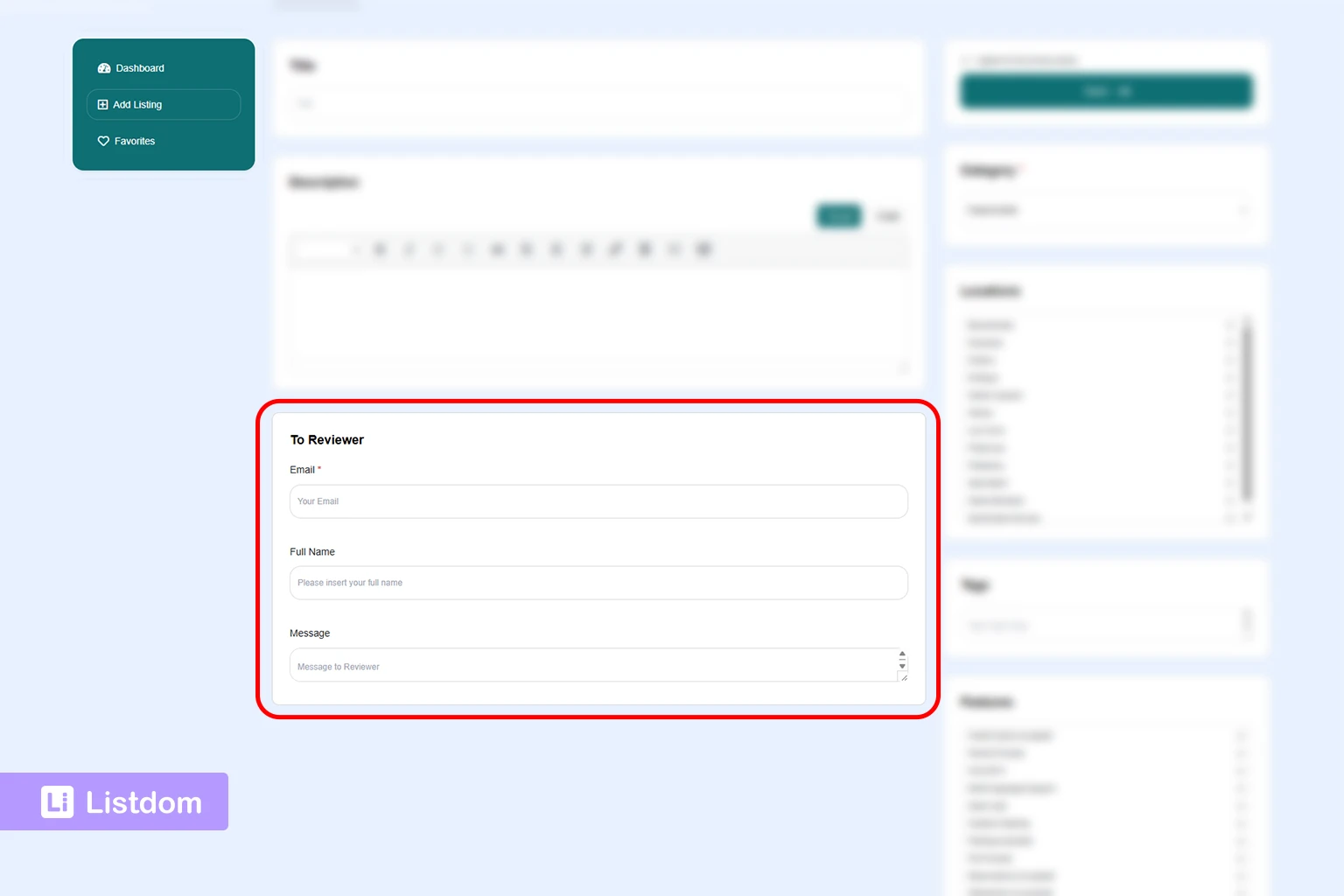
This is the more controlled guest path.
The guest can submit first, but the account is created only when the listing is approved. That can be useful when you want moderation first and account creation second.
This is helpful when:
- You want to reduce low-quality accounts
- You review listings carefully before allowing ownership
- You do not want every guest submission to instantly create an active user account
Guest submission + Once Submitted
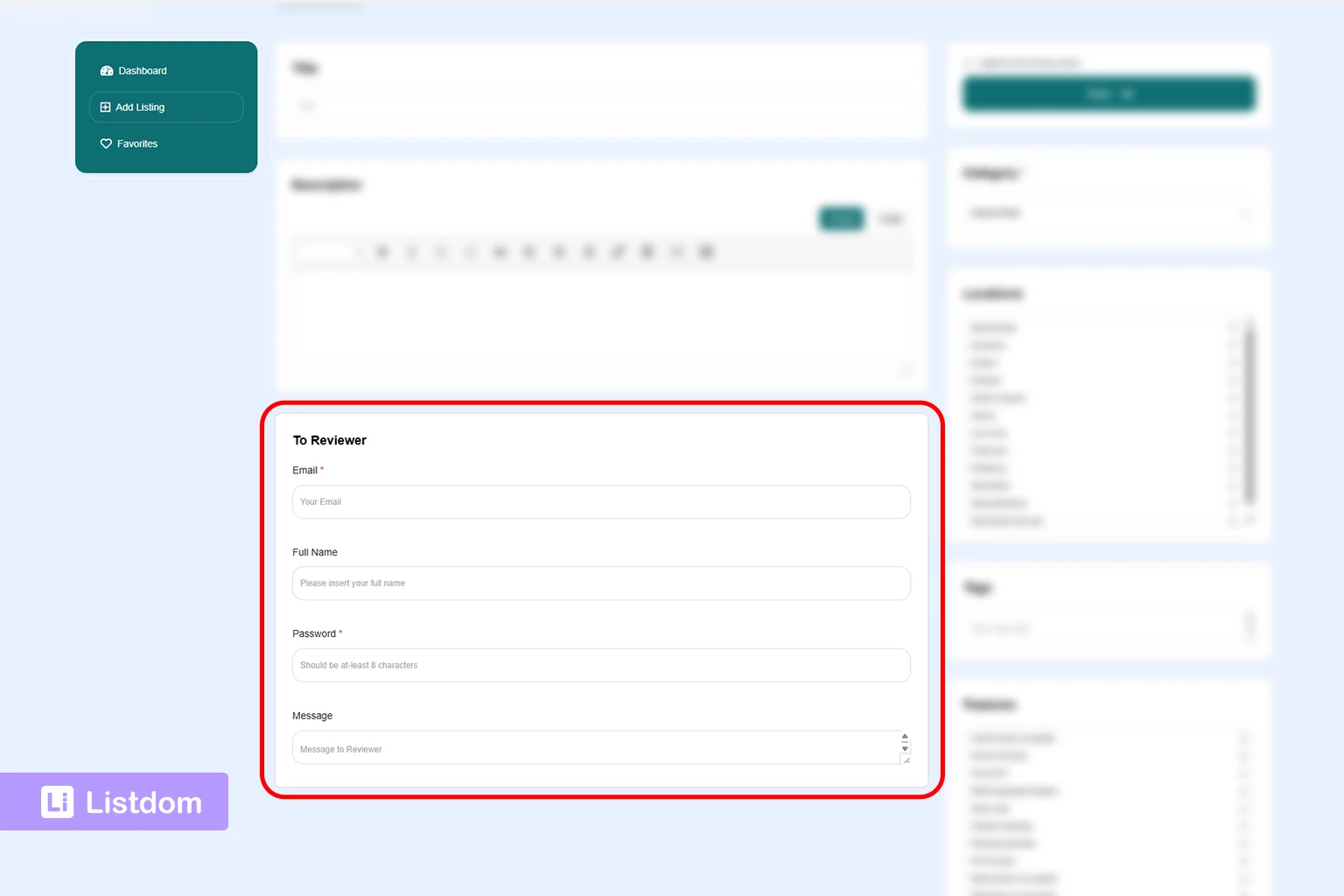
This is the fastest account-based guest path.
The guest submits the listing and is registered immediately. The form includes the details needed for immediate account creation.
This is useful when:
- You want users to keep ownership from the start
- You expect them to come back and manage listings later
- You want a smoother move from guest submission into long-term user accounts
Guest submission + Disabled registration
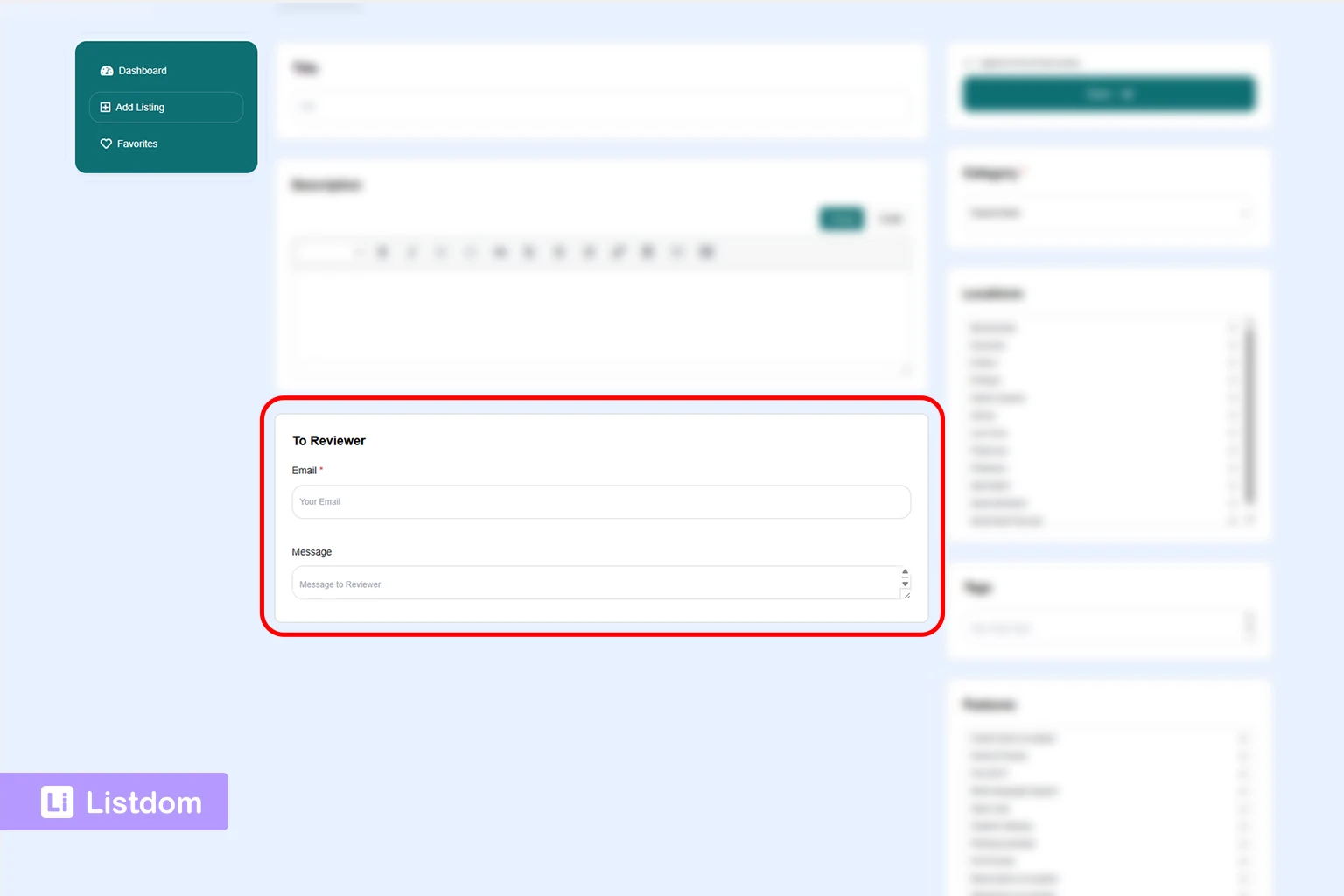
This is the loosest version.
A listing can be submitted without automatically creating a user account.
This may sound attractive for reducing friction, but it can create problems later if the submitter expects to edit the listing, manage it, or prove ownership. In most real directory sites, this is the least flexible option unless you have a very specific workflow in mind.
2. Guest submission disabled + Listdom login/register flow
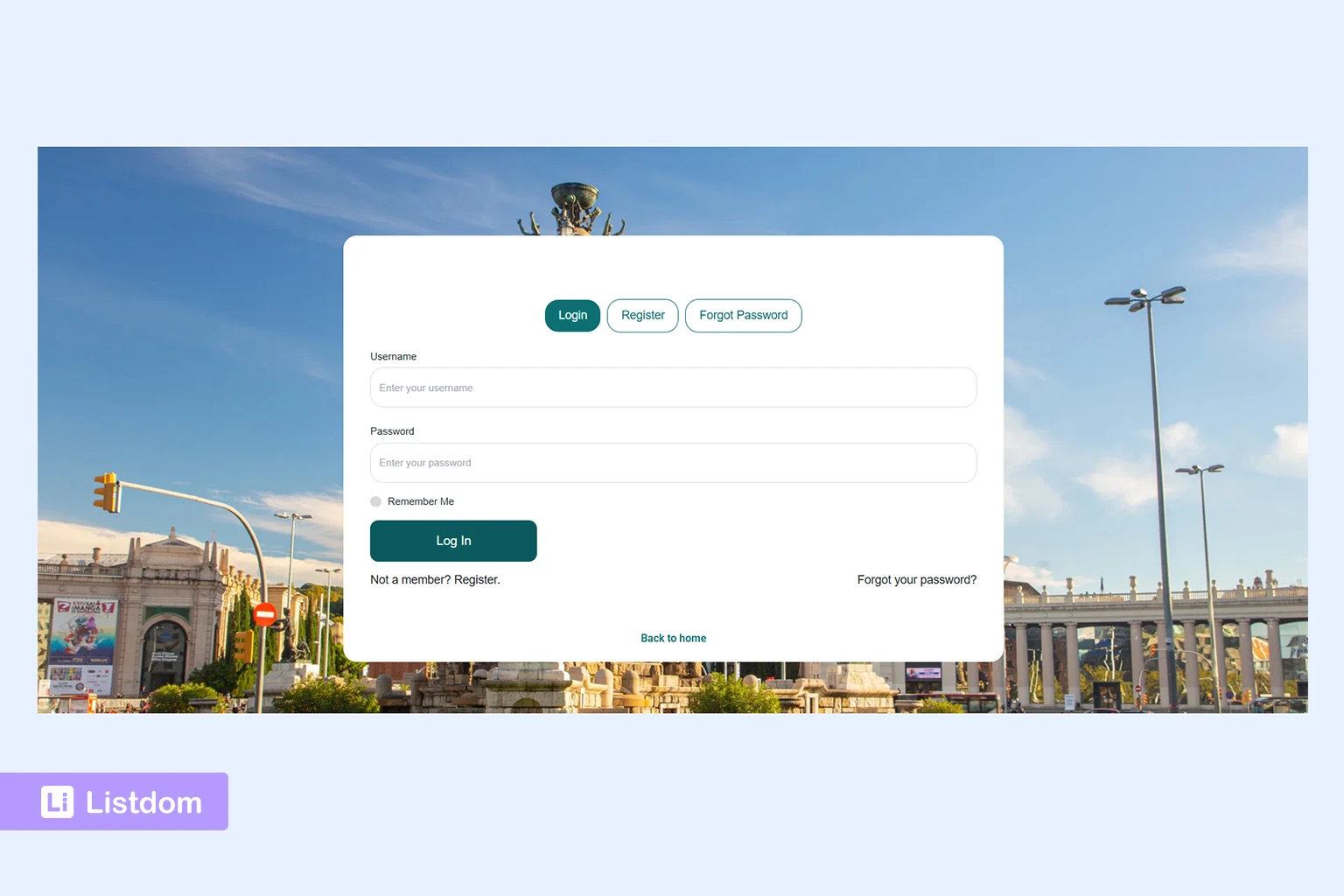
When guest submission is disabled, users do not go straight into submission.
Instead, they meet the Listdom authentication flow first if the Redirect to Login option is disabled in Listdom → Settings → Frontend Dashboard → Add Listing → Guest Submission.
This is usually the best middle-ground setup for many directories because it keeps the experience on the front end while still requiring a user account.
It is useful when:
- Listing ownership matters
- Users need to return and edit listings later
- Your dashboard is an important part of the site experience
- You want the login and registration journey to feel integrated with the site rather than technical
This pattern is often the most natural for:
- service directories
- business directories
- lead-generation directories
- member-oriented directories
3. Guest submission disabled + redirect to WordPress login
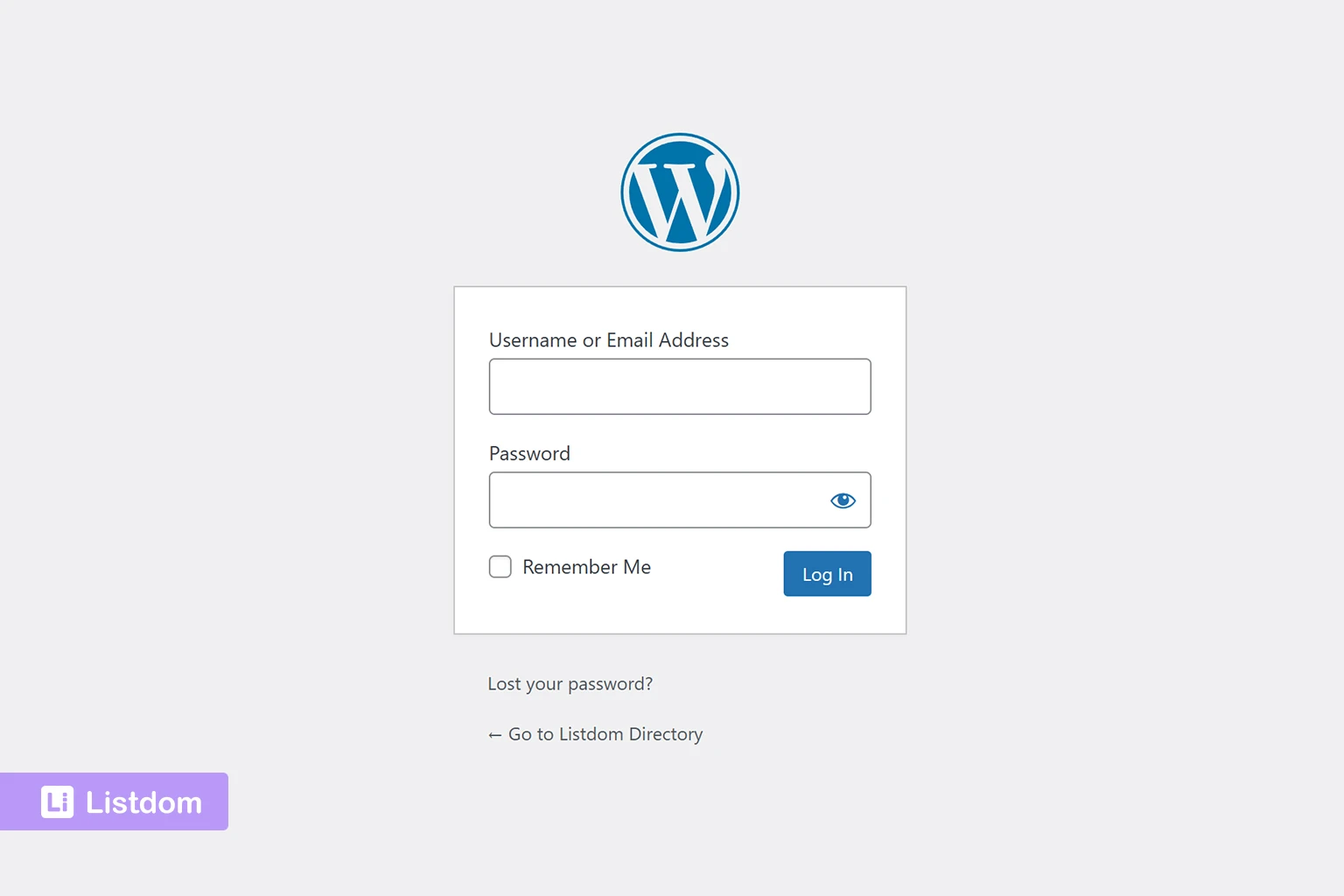
If guest submission is disabled, you can also enable Redirect to Login.
This setting matters a lot because it decides what non-logged-in users see next.
In practice, the logic is:
- if Guest Submission is disabled and Redirect to Login is off, users see Listdom’s front-end authentication flow
- if Guest Submission is disabled and Redirect to Login is on, users are sent to the default WordPress login page instead of seeing Listdom’s login/register prompt unless you have changed the default WordPress authentication pages.
So the built-in Listdom authentication flow is the default front-end path, while the WordPress login page is the more explicit redirect-based path.
This can make sense when:
- your whole site already depends on the WordPress login flow
- you already use custom WordPress login handling outside Listdom
- you want authentication centralized around WordPress itself
But for many directory sites, this feels less integrated than the built-in front-end flow.
So this is not automatically the wrong choice, but it should be an intentional one.
If you want to manage and change this behavior, the main place to review is:
Listdom → Settings → Frontend Dashboard
That is where Guest Submission and Redirect to Login work together to shape the first access step.
4. Package-first or membership-controlled submission
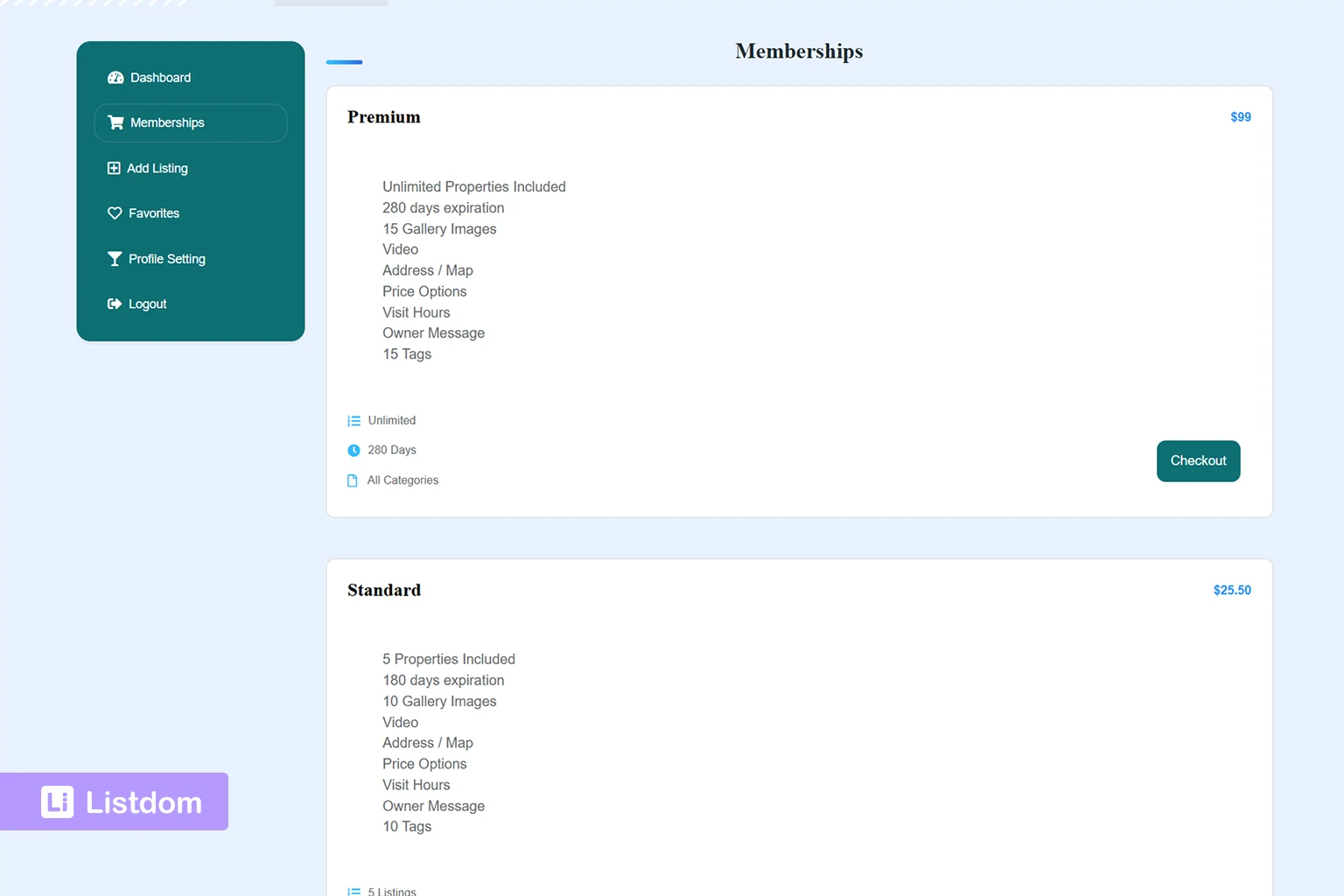
This is the scenario many users overlook at first.
If the Membership add-on is active and listing submission depends on packages, the user may need to choose or purchase a package before they can submit a listing.
That means the access journey can become:
- reach dashboard
- log in or register if needed
- land on the Memberships area
- choose or buy a package
- then continue to Add Listing
This matters because it changes both expectations and friction.
For a paid directory, this is often correct.
For a simpler directory, it may feel too heavy unless you have a free starter package or a clear explanation of why the package step comes first.
What if guest submission is enabled and membership packages exist?
This is one of the most important edge cases to understand.
Guest submission and membership packages do not always work as naturally together as people expect.
If package selection or purchase is required before listing submission, the user eventually needs an account-based path because package ownership, checkout, and membership rights are tied to a user.
In practical terms, this usually means one of these scenarios:
- guest submission is enabled, but the site still becomes account-based when the user reaches the package step
- a free Default Membership is assigned right after registration, which softens the package-first friction
- the site is better served by a logged-in submission flow from the beginning because the package step is central to the model
So if packages are required before submission, guest submission becomes less valuable unless you have designed a very intentional path around it. The guest submission only unllocks the Dashboard menu and not the Add Listing form.
For many paid directories, the cleaner model is to require login or registration first, then handle package selection clearly. For softer onboarding, a free default membership is often the more user-friendly solution.
Where the Users settings matter
This is one of the biggest missing pieces in many explanations of Listdom access flow.
The Users settings are not just cosmetic. They shape the authentication experience around the dashboard.
Important items here include:
Authentication forms
Listdom supports a combined authentication flow through its authentication shortcode, and it also supports separate login, register, and forgot-password pages.
That means you can keep everything in one place or split the flow into dedicated pages if that feels cleaner for your site.
This is especially useful when you want the frontend journey to feel branded and intentional instead of sending users through a generic-looking access path.
The important clarification here is that these are Listdom forms, not the default WordPress login form. The combined auth flow is based on the Listdom authentication shortcode, and the dedicated pages use Listdom shortcodes for login, registration, and forgot password.
Change default pages
You can change the default site authentication pages for:
- login
- registration
- forgot password
These pages should use the corresponding Listdom shortcodes. This settings affect the whole site.
This is useful when you want a cleaner or more branded access journey.
Auto login after registration
This setting matters a lot.
If auto login is enabled, new users can be logged in immediately after registering and sent to a meaningful next page.
That can make the dashboard journey much smoother.
If it is disabled, registration can feel more interrupted unless the next step is explained well.
Password policy
The user’s settings also let you shape how strong the registration flow should be.
This includes password-policy options such as strong-password requirements, minimum length, and character rules. These options matter because a low-friction flow should still feel trustworthy.
If your site is meant for serious business owners, paid submissions, or member dashboards, it is often worth keeping registration quality high instead of making the password step too loose.
Redirects by role
Listdom lets you define different redirect pages for roles such as:
- Subscriber
- Contributor
- Listdom Author
- Listdom Publisher
That matters because not every new user should always land in the same place after logging in or registering.
Account URL and logout redirect
These settings help shape the broader account journey.
If your Frontend Dashboard is the main user hub, the account URL should support that journey instead of sending users somewhere unrelated.
Block admin access
This is especially important for directory sites using frontend submission.
Listdom can block selected roles from wp-admin. That makes sense if you want users to stay in the Frontend Dashboard instead of entering WordPress admin.
But if you enable this, you need to make sure the frontend journey is complete enough for those users to do what they need.
Where memberships and packages matter
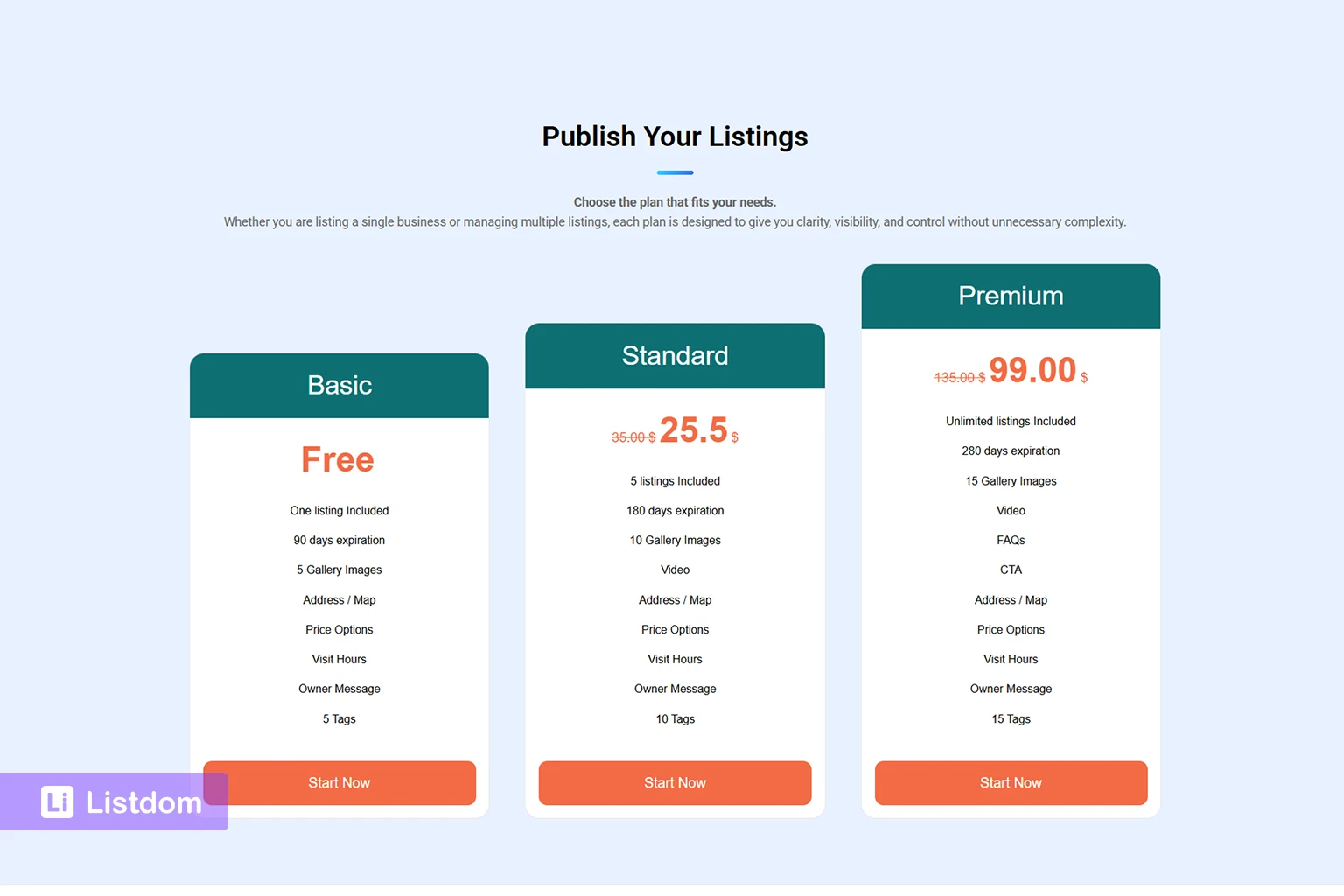
If you use the Membership add-on, access flow becomes more than authentication.
It becomes part of your monetization logic too.
Important membership scenarios include:
Scenario A: package required before submission
This is common in paid directories.
A user cannot submit until they have a valid package. So after login or registration, they may be sent to the Memberships section to choose a plan.
This is a good fit when:
- listing submission is paid
- package limits matter
- you want listing ownership and billing clearly tied together
Scenario B: free default membership
The Membership settings support a Default Membership. This option exists in the Listdom → Settings → Addons → Membership Addon.
This can be very useful because it lets you keep a structured membership workflow without forcing every user into immediate payment.
In practice, this can create a smoother path such as:
register → receive free starter package → submit first listing
This is often a strong choice when you want both structure and low friction.
It is also one of the best answers when you want package-based control but do not want new users to feel blocked before they even understand the dashboard.
Scenario C: premium upgrade later
A user may start with a free or limited package, then upgrade later for more listings or better features.
This is often easier for onboarding than forcing payment at the very first step.
The user roles that affect this flow
The docs recommend paying attention to Listdom Author and Listdom Publisher.
These roles are especially important for frontend submission because they affect how listings behave after submission.
In practical terms:
- Listdom Publisher is better when approved users can publish directly
- Listdom Author is better when you want submissions to remain pending review
This means access flow is not only about login. It also affects what happens after submission.
Two users can complete the same form and still have different outcomes depending on their role and your moderation setup. To changes the default role of the registered users, go to WP Dashboard → Settings → General → New User Default Role.
The real scenarios you should plan for
To make this article actually useful, it helps to think in real site models.
Scenario 1: open community directory
Recommended pattern:
- guest submission enabled
- strong spam protection and privacy settings
- clear moderation workflow
- simple submission form
Why:
This reduces friction and helps content growth.
Scenario 2: curated local business directory
Recommended pattern:
- guest submission disabled or guest + approval-based registration
- front-end login/register flow preferred over WordPress login in many cases
- account ownership clear from the start or after approval
Why:
This keeps quality and ownership cleaner.
Scenario 3: paid directory with packages
Recommended pattern:
- login/register required
- memberships active
- package selection before add listing, or a default free starter package if you want a softer entry
Why:
This keeps commercial logic, ownership, and submission rights aligned.
Scenario 4: central member dashboard with several custom menus
Recommended pattern:
- account-based flow required
- Frontend Dashboard as the main user hub
- role redirects and account URL configured carefully
- wp-admin blocked for submitter roles if the frontend journey is complete enough
Why:
The richer the user-side system becomes, the less sense guest-first access usually makes.
A practical decision framework
If you are unsure which setup to use, ask these questions in order:
- Do users need to manage listings later? If yes, avoid a pure guest flow unless you are very sure about the ownership model.
- Do you want to moderate before creating real user ownership? If yes, guest submission with Once Approved may fit.
- Do you want a smoother account-based flow from the first submission? If yes, guest submission with Once Submitted or a standard front-end login/register flow may fit better.
- Do packages control submission rights? If yes, plan the membership step early. Do not treat it like an afterthought.
- Do you want users to stay out of wp-admin completely? If yes, pay attention to Users settings, account URL, role redirects, and blocked admin access.
Common beginner mistakes
Turning off guest submission without checking the next screen
It is not enough to disable guest submission. You must check whether users see the front-end auth form or the WordPress login page, and whether that is really the experience you want.
Ignoring the Users settings
Many people focus only on Frontend Dashboard settings and miss the fact that Users settings control a big part of the login, register, redirect, and account journey.
Forgetting the package step
If packages are required before submission, that changes the whole flow. It should be planned up front.
This matters even more if guest submission is enabled, because package-based submission can still force the journey back into an account-based flow.
Using a strict flow without a clear reason
Extra friction should buy you something meaningful: moderation quality, billing control, cleaner ownership, or member-only features.
Not testing with a normal user account
Admin testing is not enough.
You need to test with a real non-admin account and, ideally, one scenario with no account at all.
What to configure first
A practical order looks like this:
- decide whether submission can start without login
- decide what happens when a guest tries to continue
- review Frontend Dashboard guest-submission and redirect settings
- review Users settings for auth pages, auto login, redirects, password policy, and blocked admin access
- decide whether packages or memberships come before submission
- if memberships are active, decide whether a Default Membership should soften the journey
- test the full journey with a normal user account
- then refine moderation, roles, and advanced access details
That order keeps the flow clear and prevents surprise blockers later.
What to learn next
Once this part is clear, the best follow-up articles are:
- How the Listdom Frontend Dashboard Works?
- How Listdom Settings Work: Global, Shortcodes, Search, and Add-ons?
- How to Create Search Forms in Listdom?
- How to Display Listings in Listdom with Shortcodes?
These topics help connect access flow to the rest of the real submission journey.
Final thoughts
The best Listdom access flow is not the one with the most options.
It is the one that matches your directory model.
For some sites, that means low-friction guest submission.
For others, it means a front-end account flow, package-first submission, or role-based moderation.
The key is to plan the whole journey together:
- Frontend Dashboard settings
- Users settings
- membership/package logic
- roles and moderation
Once those work together, the site feels much clearer to users.
FAQ
Can users submit listings without an account?
Yes, if guest submission is enabled. But the exact experience depends on how you handle guest registration and whether package-based submission later forces the journey into an account-based path.
What happens when guest submission is disabled?
Users will either see Listdom’s front-end authentication flow or be redirected to the WordPress login page, depending on whether Redirect to Login is enabled in the Frontend Dashboard settings.
Where do I control the login and submission journey?
Mostly in Listdom → Settings → Frontend Dashboard and Listdom → Settings → Users. If packages or memberships are part of submission, the Membership settings also become part of the journey.
Do the Users settings really matter here?
Yes. They control auth forms, redirects, auto login, account URL, logout behavior, and blocked admin access, so they shape a large part of the real access journey.
When do memberships change the flow?
They matter when packages are required before listing submission or when users need package-based permissions and limits.
What is a good low-friction but still structured setup?
A common answer is either front-end login/register before submission, or a free default membership that lets new users start without immediate payment.
Do I need to test this with a normal user account?
Yes. That is one of the most important checks you can do before launch.